
A WordPress landing page builder is often the first plugin people install when they need a focused campaign page. Before you add one, it is worth asking whether you need a separate tool at all.
The block editor now builds landing pages natively. Dedicated plugins still offer things it does not. The right call depends on how many pages you ship and how much speed you are willing to trade for prebuilt templates.
This guide weighs the plugin route against the native approach, then shows how to build a fast landing page either way.
What a WordPress Landing Page Builder Gives You
Dedicated builders like SeedProd and Beaver Builder sell speed and templates. You get a library of pre-made landing pages, a drag-and-drop canvas, and conversion features like countdown timers and opt-in forms.
For someone launching dozens of campaign pages a year, that template library earns its cost. You pick a layout, swap the copy, and publish within an hour. The convenience is real and worth naming.
Dedicated Plugin vs the Native Block Editor
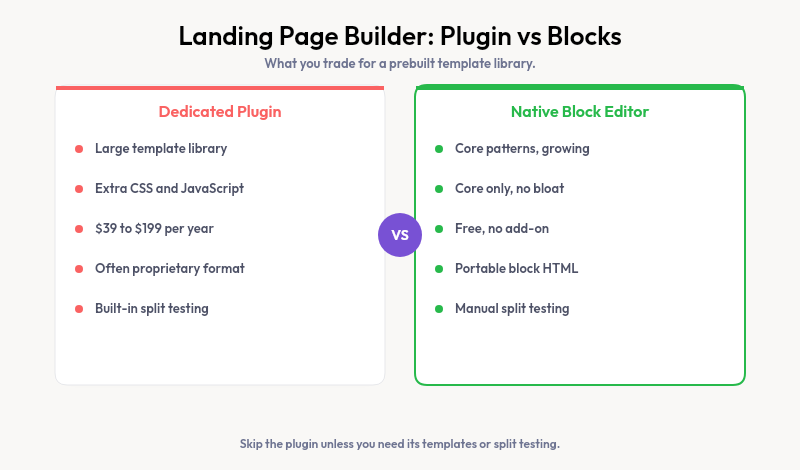
What do you give up by skipping the plugin? Less than you might think. Here is how the two approaches line up on the factors that decide a project.
| Factor | Landing page plugin | Block editor |
|---|---|---|
| Templates | Large prebuilt library | Core patterns, growing |
| Page weight | Extra CSS and JavaScript | Core only |
| Cost | $39 to $199 per year | Free |
| Blank templates | Built in | Full Site Editing |
| Content portability | Often proprietary | Plain block HTML |
The plugin leads on ready-made layouts. The native editor leads on speed, price, and keeping your content in a format that outlives any single tool.
The Hidden Cost of Page Builder Plugins
You have chosen a template, dropped in your copy, and published. Then the page loads slower than the rest of your site. That drag comes from the builder itself.
Every builder plugin loads its own CSS and JavaScript on each page a visitor opens. That weight drags down Core Web Vitals, which affects both rankings and conversion rates.
There is a lock-in cost too. Many plugins store your layout in proprietary shortcodes. Deactivate the plugin and the page collapses into a mess of unrendered tags. A landing page built with core blocks stays intact, because blocks are plain HTML.
When a Plugin Is Genuinely Worth It
There is one feature the native editor does not match yet: built-in split testing. Dedicated builders can serve two versions of a page and report which one converts better.
If your business runs on paid traffic, that testing loop can pay for the plugin on its own. Shaving a few points off your cost per lead outweighs a little extra page weight.
Outside of active testing, the case thins out. For an about page, a product page, or a launch you are not actively split testing, native blocks deliver the same result with less overhead.
Building Landing Pages With Blocks and Patterns
The native route is simpler than most people expect. Create a blank template in the Site Editor to strip the header and footer, then assemble sections from block patterns.
Our full walkthrough on how to make a WordPress landing page covers the steps in order. If you still need a starting theme, our list of free landing page themes narrows the field. Both use only native tools and cost nothing.
Matching Patterns to Your Brand
The one place the native approach struggles is design polish. Core patterns are generic, and borrowed patterns rarely match your palette or spacing.
Strakture answers that without a page builder. It reads your theme’s colors, fonts, and spacing, then generates landing page sections that fit. You get a hero, a feature grid, and a call to action tuned to your design, all as native blocks.
The result loads as light as any core page, because that is exactly what it is. You skip the builder tax and still start from something that looks designed.
Launch Pages That Load Fast
Reach for a dedicated builder when you publish campaign pages constantly and lean on its template library daily. Skip it when speed and portability matter more than prebuilt layouts, which covers most sites.
Either way, keep the page light. Strakture gives you theme-matched sections inside the block editor, so your landing pages load fast and still look the part.
Do I need a landing page builder for WordPress?
Not always. The block editor with Full Site Editing builds landing pages using blank templates and patterns, no plugin required. A dedicated builder makes sense when you publish campaign pages often and want a large template library and built-in conversion tools.
Can you build a landing page in WordPress without a plugin?
Yes. Create a blank custom template in the Site Editor to remove the header and footer, then add sections with block patterns. The result loads faster than any page builder version and keeps your content as portable plain HTML.
What is the best free WordPress landing page builder?
The native block editor is the strongest free option, since it ships with WordPress and adds no page weight. Plugins with free tiers exist but usually gate templates behind paid plans. For theme-matched sections at no cost, Strakture’s free plan lets you browse and insert originals.
Does a landing page plugin slow down WordPress?
It can. Builder plugins load extra CSS and JavaScript on every page, which raises load time and hurts Core Web Vitals. Caching softens the impact, but native blocks stay lighter because they carry no framework overhead.

Leave a Reply