
Choosing between the WordPress block editor vs Elementor usually gets framed as beginner against pro. That framing is wrong. The real question is how much page weight you are willing to trade for drag-and-drop convenience.
Both tools build pages inside WordPress. One ships with core and adds nothing extra to your load time. The other bolts a full design app on top of every page a visitor opens. Your pick shapes site speed, search rankings, and how much you spend each year.
This comparison covers what each does well, where the native editor now matches a page builder, and how to decide based on your actual project.
WordPress Block Editor vs Elementor at a Glance
Here is the short version before the details. The block editor is the native WordPress interface. Elementor is a plugin that replaces it with a visual canvas and its own rendering layer.
| Factor | Block Editor | Elementor |
|---|---|---|
| Cost | Free, built in | Free tier, Pro from $59/yr |
| Page weight | Core only | Adds roughly 1.4MB per page |
| Design control | Improving, pattern based | Pixel level |
| Header and footer | Full Site Editing | Theme Builder (Pro) |
| Content lock-in | Plain block HTML | Proprietary shortcodes |
| Best for | Fast content sites | Complex custom layouts |
How Page Weight and Speed Compare
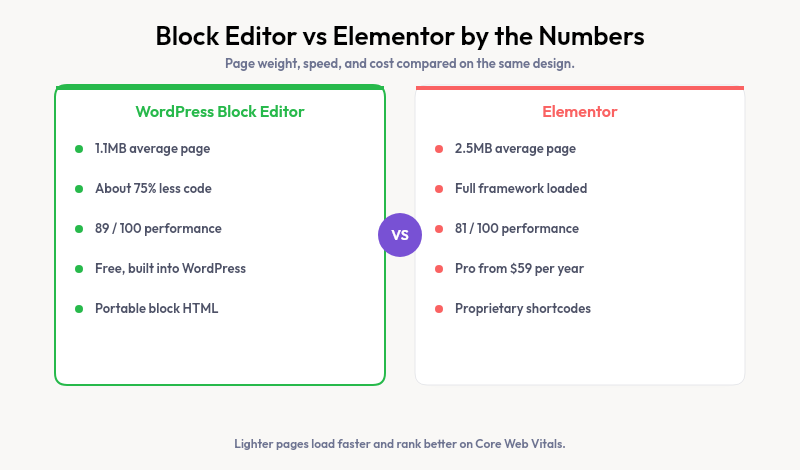
Numbers settle this faster than opinions. An Elementor homepage averages around 2.5MB. A tuned block-based page of the same design lands near 1.1MB.
Gutenberg produces roughly 75% less code for an identical layout. In one 2026 benchmark, the native editor scored 89 out of 100 on performance at 3.5 seconds, against 81 and 5 seconds for the page builder.
Page weight feeds straight into Core Web Vitals, which Google uses as a ranking signal. Lighter pages paint sooner, rank better, and hold visitors longer.
Where Elementor Still Wins
Speed is not the whole story. If you have tried to build a complex marketing page with only core blocks, you have hit the ceiling and felt it.
Elementor gives pixel-level control over spacing, motion effects, and popups. Its Theme Builder designs headers and footers plus dynamic templates in one visual interface. For WooCommerce stores with custom product layouts, that depth saves real hours.
Designers who need exact placement without writing CSS get it here. That control is why the plugin runs on millions of sites and keeps its fans.
When the Block Editor Is the Better Choice
What changed is how much the native tool can now do. Full Site Editing lets you design headers, footers, and whole templates without a builder plugin at all.
Block themes read a theme.json file that defines your colors, type scale, and spacing. Every block pulls from those tokens by default. For blogs, brochure sites, and most small business pages, that covers the whole job.
Content built as blocks lives as plain HTML in your database. Swap themes or drop a plugin later, and the page survives. Layouts stored in shortcodes do not travel nearly as cleanly.
Using Both on the Same Site
The decision is not always either-or. Plenty of sites run the block editor for blog posts and standard pages, then reach for Elementor on a handful of high-stakes marketing layouts.
This hybrid keeps most of your site light while giving your top campaign pages the extra design control. The cost is maintaining two systems and loading the builder’s assets only where they earn their keep.
If you take this path, keep the page builder off your blog and core pages. Reserve it for the few layouts that truly need pixel placement, and let native blocks carry the rest of the site.
Closing the Design Gap Without a Page Builder
The native editor’s weak spot is the blank canvas. Core patterns are limited, and mixing patterns from random libraries breaks visual consistency within a section or two.
This is the gap Strakture fills. It reads your active theme’s design system, then generates block patterns that match your colors, fonts, and spacing. You get section layouts that look native without any page builder overhead.
Strakture supports Kadence, Neve, Blocksy, Astra, and other popular themes. You stay in the block editor and keep the lighter page weight, while starting from patterns closer to a finished design.
Build Faster Without the Bloat
Pick Elementor when a project demands pixel-perfect custom layouts and you accept the extra weight. Choose the block editor when speed, portability, and native Full Site Editing cover your needs, which is true for most sites in 2026.
If your only reason to reach for a page builder is nicer starting layouts, Strakture hands you theme-matched patterns without that trade-off.
Is the WordPress block editor better than Elementor?
Better depends on the goal. The block editor produces lighter, faster pages and keeps content portable. Elementor gives finer design control and a bigger template library. For content sites and standard business pages, the native editor usually wins on speed and cost.
Can Gutenberg replace Elementor?
For most sites, yes. Full Site Editing now handles templates, headers, and footers that once required a page builder. Very complex marketing layouts with heavy animation still favor Elementor, but the block editor covers the majority of real projects.
Does Elementor slow down your website?
It adds weight. Elementor loads its own CSS and JavaScript on every page, pushing a typical homepage near 2.5MB against roughly 1.1MB for a block-based equivalent. Good hosting and caching help, but the extra code is always there.
Is Elementor still worth it in 2026?
Yes, for the right use. Agencies building custom client layouts and stores with complex product pages get real value from its control. If you mostly publish content and value speed, the native block editor plus theme-matched patterns is the leaner path.

Leave a Reply