
WooCommerce support in Strakture is a Pro feature. It is designed for block-theme sites that want a faster way to build and customize store layouts while keeping everything visually aligned with the active theme.
WooCommerce Compatibility Overview
Strakture Pro works with WooCommerce-ready starter demos and block-theme workflows.
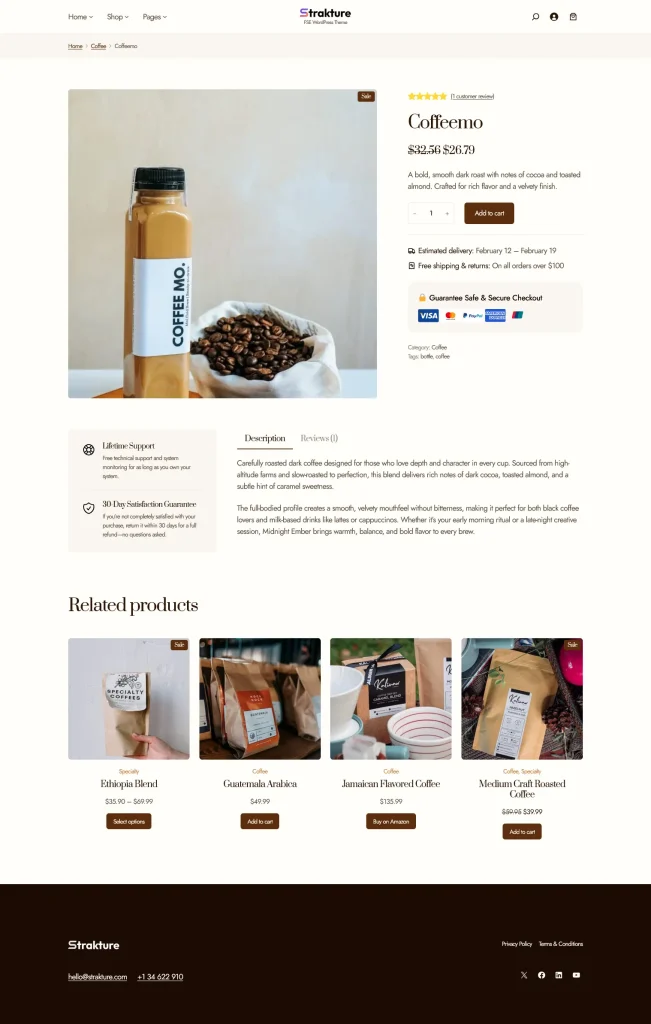
With WooCommerce enabled, Strakture can help you:
- work with WooCommerce-ready starter sites
- use store-related templates more easily in a block-theme setup
- customize store pages with patterns and blocks
- keep your shop, product, and cart experience visually consistent with the rest of your site
If you are using a compatible Strakture Pro setup, WooCommerce pages and templates can be configured automatically during starter site import.
Shop, Product, and Cart Templates
WooCommerce stores rely on several important templates and pages.
Common examples include:
- the Shop page
- single product templates
- the Cart page
- the Checkout page
- the My Account page
In Strakture Pro starter demos, these WooCommerce pages can be assigned automatically when the demo is imported. That saves time and helps the store start with the right structure already in place.
WooCommerce product templates also work inside the wider block-theme template system, so you can manage them through the Site Editor when your theme supports it.
Editing WooCommerce Templates
To customize WooCommerce layouts in a block theme:
- Go to Appearance > Editor.
- Open Templates.
- Look for WooCommerce-related templates such as shop or single product templates.
- Edit the layout using blocks and template parts.
- Save your changes.
This is useful when you want to adjust things like:
- product page layout
- spacing and content width
- product information placement
- cart and checkout page structure
- headers, footers, and surrounding sections
As with any template edit, remember that changes affect all content using that template.
Customizing WooCommerce Patterns
Strakture helps you customize store pages by adding or generating content sections that fit around your WooCommerce templates.
For example, you can use the Pattern Library to add:
- hero sections above the shop grid
- trust or testimonial sections on product-related pages
- promotional call-to-action sections
- feature or benefits sections for store landing pages
In Pro, you can also generate theme-matched patterns so those sections better match your site’s colors, typography, spacing, and content direction.
This works especially well for:
- shop landing pages
- category landing pages
- promotional store pages
- product-focused marketing pages
A Good Workflow for WooCommerce Sites
A practical workflow with Strakture Pro looks like this:
- Start with a WooCommerce-ready setup or starter demo.
- Confirm that your shop, cart, checkout, and account pages are assigned correctly.
- Edit your store templates in the Site Editor as needed.
- Use the Strakture Pattern Library to add or generate supporting sections.
- Refine the final layout in the block editor or Site Editor.
This keeps the core store structure handled by WooCommerce and templates, while Strakture helps you improve the surrounding design and merchandising content.
Important Notes
- WooCommerce support is part of Strakture Pro.
- The best experience is with a block theme.
- Starter demos can speed up WooCommerce setup by assigning store pages automatically.
- Template edits affect all WooCommerce content using those templates.
- Patterns are best used to enhance store pages and marketing sections around WooCommerce content.