
A WordPress AI website builder promises a finished site from a single prompt. Type a description, wait a minute, get a homepage. The demos look impressive. The results, once you dig in, tell a more complicated story.
These tools have improved fast. Some generate full multi-page sites, others draft single sections or write copy. The distance between a slick demo and a page you would actually publish is where most buyers get stuck.
This guide breaks down what these builders really do, the two main types, and how to pick one that fits a site you already care about.
What a WordPress AI Website Builder Actually Does
Most tools under this label do one of three jobs. They generate layouts, write content, or produce images. A few handle all three at once.
Full-site generators like SeedProd, 10Web, and Bluehost’s site creator build a complete page structure from a prompt. Assistants like Elementor AI and Divi AI focus on copy and images inside an existing builder. Knowing which job you need keeps you from paying for features you will never open.
The Two Types of AI Builders
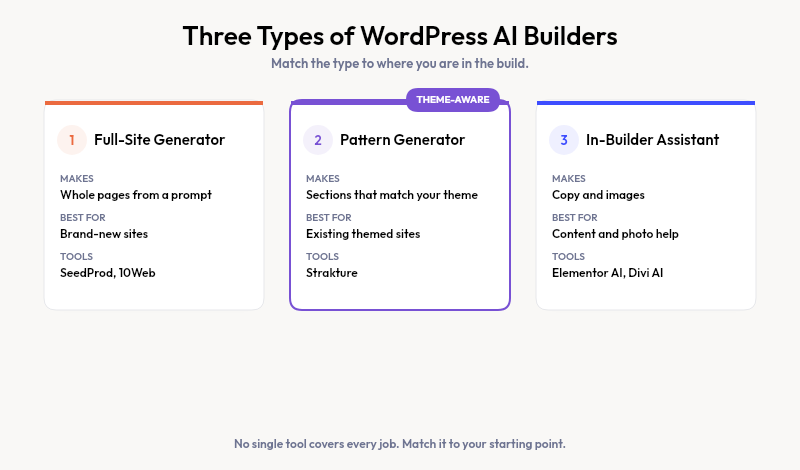
The word “builder” hides an important split. One type creates entire pages. Another creates the parts you assemble yourself. Each suits a different starting point.
| Type | What it generates | Best for | Trade-off |
|---|---|---|---|
| Full-site generator | Whole pages from a prompt | Brand-new sites | Generic, ignores your brand |
| Pattern generator | Individual sections | Existing themed sites | You assemble the page |
| In-builder assistant | Text and images | Copy and photo help | No layout generation |
A fresh project with no brand yet benefits from a full-site generator. An established site usually needs sections that match what already exists.
Where Full-Site Generators Fall Short
Generate a whole site from a prompt and you get a whole site that looks like everyone else’s prompt. The model has no knowledge of your current theme, brand colors, or type choices.
For a brand-new project, that works. For a site with an established look, the output fights your design. You spend the saved time re-styling every section to match your palette and spacing. The starting point manages to be polished and generic at the same moment.
These tools also tend to tie you to their own hosting or page builder. Leaving usually means rebuilding from scratch.
Theme-Aware Generation: A Different Approach
What if the AI read your design system first? That is the model Strakture uses. Before it generates anything, it analyzes your active theme’s colors, typography scale, spacing tokens, and layout widths.
The patterns it produces pull from those exact values. A section built for a Kadence site looks like Kadence. The same request on a Blocksy site matches Blocksy. You are not generating a generic page, you are generating parts that belong on yours.
Strakture runs inside the block editor and outputs native block patterns. There is no separate app to learn and no proprietary format to escape later. It works with Kadence, Neve, Blocksy, Astra, and more, through Full Site Editing.
What to Check After the AI Generates
Generation is the start, not the finish. Whatever tool you pick, the draft needs a human pass before it earns a place on your live site.
- Copy: replace placeholder text with specific, honest claims about your offer
- Images: swap generic stock photos for ones that fit your brand
- Spacing: confirm each section aligns with your theme’s rhythm
- Links and forms: wire up buttons the model left as placeholders
Theme-aware tools shrink the design half of this list, since colors and spacing already match your site. You still own the words and the strategy, which no builder can write for you.
How to Choose the Right Tool
Match the tool to your starting point, not to the flashiest demo. The right fit depends entirely on whether you are starting fresh or building on a design you already have.
- Starting a brand-new site with no design yet: a full-site generator drafts fast
- Extending a themed site with new sections: a theme-aware pattern generator keeps it consistent
- Only need copy or photos: an in-builder assistant does the writing
Cost follows the same logic. Full-site tools with bundled hosting run $16 to $24 a month. Pattern generators attach to what you already run, so you keep your host and your theme.json design tokens.
Build With AI That Respects Your Design
These builders are worth using once you match the type to your project. Full-site generators shine on blank slates. For sites with a look worth keeping, theme-aware generation gives you speed without the re-styling tax.
Strakture handles that middle ground. It reads your theme and generates patterns that fit, so you start closer to done instead of closer to generic.
What is the best WordPress AI website builder?
There is no single winner, because they solve different problems. SeedProd and 10Web lead for building new sites from a prompt. For adding sections to an existing themed site, a theme-aware tool like Strakture keeps your design consistent. Match the tool to your starting point.
Can AI build a full WordPress website?
Yes, full-site generators can draft a multi-page site in about a minute. The structure and copy are a starting draft, not a finished product. You still review layout, replace placeholder text, and adjust the design before the site is ready to publish.
Are WordPress AI website builders free?
Most offer a limited free tier and charge for full generation. Bundled hosting builders run $16 to $24 a month. Strakture has a free plan for browsing and inserting original patterns, with paid credits for AI generation matched to your theme.
Do AI website builders work with existing themes?
Full-site generators often replace your theme with their own system. Pattern-based tools work with the theme you already run. Strakture reads your active theme’s tokens and generates blocks that match, so an existing Kadence or Astra site stays visually consistent.

Leave a Reply