
WordPress.org AI Website Builder: What Actually Exists?
If you’ve searched for a WordPress.org AI website builder, you’ve probably hit a wall of confusing results. Half the articles talk about WordPress.com features. The other half list plugins without explaining which WordPress they work on. This confusion is baked into the WordPress brand itself, and it trips up beginners and experienced users alike.
Here’s the short version: WordPress.com now has built-in AI tools. WordPress.org, the self-hosted version, does not. But .org users have access to a growing collection of AI plugins that cover everything from full site generation to block pattern design. Let’s break down what’s available and where each tool fits.
WordPress.org hosts over 60,000 free plugins, and AI-powered tools are the fastest-growing category, with a 280% increase in AI plugin submissions between 2024 and 2025.
The .com vs .org Split Changes Everything
WordPress.com and WordPress.org share a name but operate very differently. WordPress.com is a hosted platform run by Automattic. You sign up, pick a plan, and your site runs on their servers. WordPress.org is open-source software you download and install on your own hosting.
This distinction matters because WordPress.com rolled out a built-in AI assistant in February 2026. It can edit content, adjust layouts, generate images, and help with site-wide design decisions. It’s included at no extra cost on Business and Commerce plans.
WordPress.org has no built-in AI. Instead, the core team released an MCP (Model Context Protocol) adapter that lets external AI agents interact with your site. Think of it as infrastructure, not a finished product. The actual building tools come from plugins.
WordPress.com’s AI site builder has generated over 1 million sites since its launch, though WordPress.org’s self-hosted ecosystem offers more control over which AI tools are used.
So when someone asks “does WordPress offer an AI website builder,” the honest answer depends on which WordPress they mean. The .com version does. The .org version gives you the freedom to choose from dozens of third-party options.
AI Plugins That Work on Self-Hosted WordPress
Self-hosted WordPress users won’t find a single “build my site” button in the dashboard. But the plugin ecosystem now includes several AI-powered tools that handle different parts of the site-building process. Some generate full pages. Others focus on specific layers like design, content, or layout.
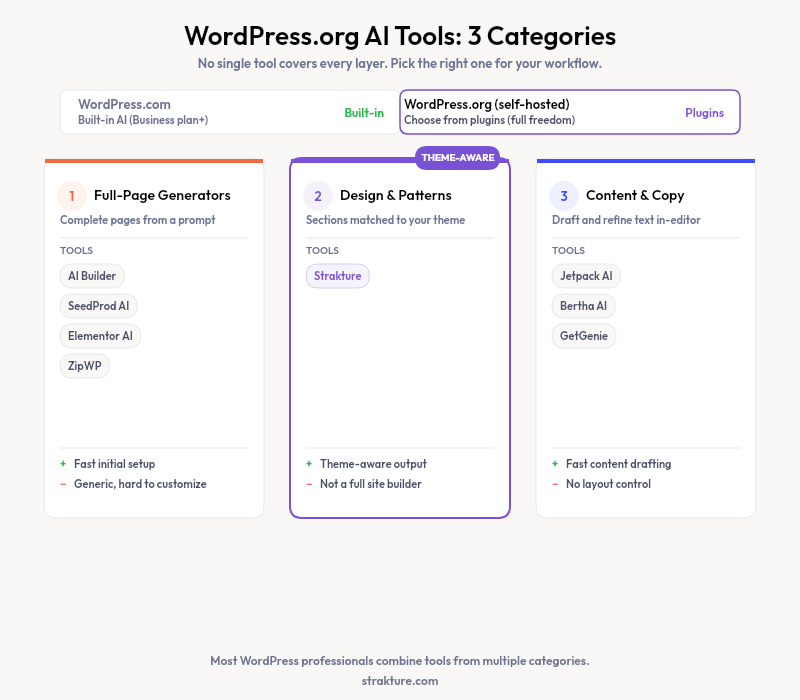
Here’s what’s available right now, grouped by what each tool actually does.
Full-Page and Full-Site Generators
AI Builder by Starter Templates generates complete WordPress pages using standard Gutenberg blocks. You describe what you want, and it produces editable pages saved directly to your database. If you cancel, your content stays intact. It offers 100 free credits on signup.
SeedProd takes a guided approach. You answer questions about your site, and its AI produces pages you can customize with drag-and-drop. Paid plans start around $40 per year. Elementor AI works inside the Elementor editor, generating sections and layouts without switching tabs.
10Web and ZipWP also offer AI-driven site generation for WordPress.org installs. Each takes a slightly different approach to how much control you get during and after the build process.
Design and Pattern Tools
Full-page generators build fast, but they don’t always match your theme. If you’re using a block theme like Kadence, Neve, or Blocksy, generic AI output can look out of place. The colors, spacing, and typography won’t line up with your design tokens.
Strakture solves this specific problem. It analyzes your active theme’s color palette, typography, spacing, and layout conventions, then generates FSE block patterns that match. The output looks like it belongs on your site because it’s built from your theme’s actual design system. A free tier lets you browse and insert original patterns, while paid plans ($19 to $199 per month) unlock AI generation.
This pattern-layer approach is different from a full site builder. You’re not generating an entire site from scratch. You’re adding sections, hero areas, feature grids, and other components that respect your existing design choices.
Content and Copy Generation
Several plugins focus strictly on text. Jetpack includes an AI writing assistant that drafts posts, adjusts tone, and translates content. Bertha AI and GetGenie work as in-editor copilots for blog posts, product descriptions, and ad copy. These won’t build your site structure, but they fill pages with polished content quickly.
How to Pick the Right AI Tool for Your WordPress.org Site
The “best” tool depends on where you are in the building process. Starting from zero? A full-page generator like AI Builder or SeedProd gets a basic structure in place fast. Already have a theme configured with your brand colors and fonts? A pattern tool like Strakture adds sections that actually match.
Most experienced WordPress users combine multiple tools. They might use a page generator for the initial structure, a pattern tool for design-consistent sections, and a content plugin for the final copy. No single plugin covers every layer perfectly.
- New site, no theme yet: Start with a full-site generator to get the basic layout and structure
- Existing theme, adding pages: Use pattern generators that read your design tokens and produce matching blocks
- Site built, need content: Add a copy-focused AI plugin to write and refine text within the editor
- Developer workflow: Connect AI agents through the WordPress MCP adapter for programmatic site management
What Self-Hosted WordPress Gets Right (and Wrong) With AI
The biggest advantage of the .org approach is choice. You’re not locked into one company’s AI model or pricing structure. If a better tool launches next month, you can install it alongside what you already have. WordPress.com users get a polished, integrated experience, but they’re limited to what Automattic ships.
The downside is fragmentation. There’s no unified “AI layer” in self-hosted WordPress yet. The MCP adapter is a step in that direction, but it’s still early. For now, you’ll likely juggle two or three plugins to cover site structure, design, and content. That’s more setup work than a single hosted solution, but it gives you full ownership of every piece.
Pricing also varies wildly. Some plugins offer generous free tiers. Others charge $40 to $240 per year. A few use credit-based models where you pay per generation. Compare the cost against how many pages you’ll actually build. Most sites need a burst of AI help during the initial build, then occasional additions over time.
Getting Started With AI on WordPress.org
If you’re running a self-hosted WordPress site and want AI assistance, start by identifying what you actually need. A complete site from scratch requires a different tool than adding branded sections to an existing theme. The WordPress theme developer handbook explains how block themes work, which is useful background for understanding what AI tools generate.
For the design layer specifically, Strakture is worth testing if you already have a block theme configured. Its free tier costs nothing to try, and the pattern output respects your theme’s design system rather than applying generic styles. That theme-aware approach saves time you’d otherwise spend manually adjusting colors and fonts on every AI-generated block.
The WordPress.org AI ecosystem is still young. New plugins appear regularly, and existing ones add features every few months. The tools available today are already practical for real projects. They’ll only get sharper as the MCP standard matures and more developers build on it.
Does WordPress.org have a built-in AI website builder?
No. WordPress.org is open-source software without built-in AI features. However, dozens of plugins add AI capabilities to self-hosted WordPress sites. These range from full-page generators to design-specific pattern tools. WordPress.com (the hosted platform) does include a built-in AI assistant on its Business and Commerce plans.
Can I build an entire WordPress site with AI for free?
Partially. Several plugins offer free tiers or trial credits. AI Builder gives 100 free credits at signup, and some pattern tools let you browse and insert originals at no cost. But full AI generation typically requires a paid plan or credit purchase. Free tiers are best for testing before you commit to a subscription.
What is the difference between an AI site builder and an AI pattern generator?
An AI site builder creates complete pages or entire sites from a text prompt. An AI pattern generator produces individual sections (hero blocks, feature grids, testimonials) matched to your theme’s design system. Site builders are better for starting from scratch. Pattern generators work best when you already have a configured theme and want additions that blend in.
Will AI-generated WordPress blocks break if I uninstall the plugin?
It depends on the tool. Plugins that generate standard Gutenberg blocks (like AI Builder and Strakture) leave fully editable content in your database after removal. Tools built on proprietary frameworks may lose formatting or functionality when deactivated. Always check whether a plugin produces native WordPress blocks before committing.

Leave a Reply