
Most guides to WordPress theme customization stop at picking colors and fonts. The deeper layer, the one that controls whether new sections match your site, lives in a structured file called theme.json and a cascade of CSS variables that flow from it.
Understanding that layer changes how you approach every build decision. It explains why external patterns break your site’s look, and why some themes stay consistent at scale while others turn into a patchwork of manual fixes.
What Theme Customization in WordPress Actually Controls
You’ve visited the Site Editor, adjusted a few colors, and picked a heading font. That interaction is the front door to a much larger system. Block themes store every one of those decisions in theme.json, the single source of truth for your site’s visual rules.
WordPress 6.6 introduced over 50 new design controls in the Site Editor, and usage data from WordPress.org shows that 89% of block theme users rely on Global Styles as their primary customization method.
Here is what that file governs on a modern block theme:
- Color palette: Primary, secondary, accent, background, and text colors
- Typography presets: Font families, sizes, weights, and line heights
- Spacing scale: Padding and margin tokens from extra-small to extra-large
- Layout widths: Content area boundaries and wide alignment limits
- Block-level defaults: Button border radius, image aspect ratios, heading letter spacing
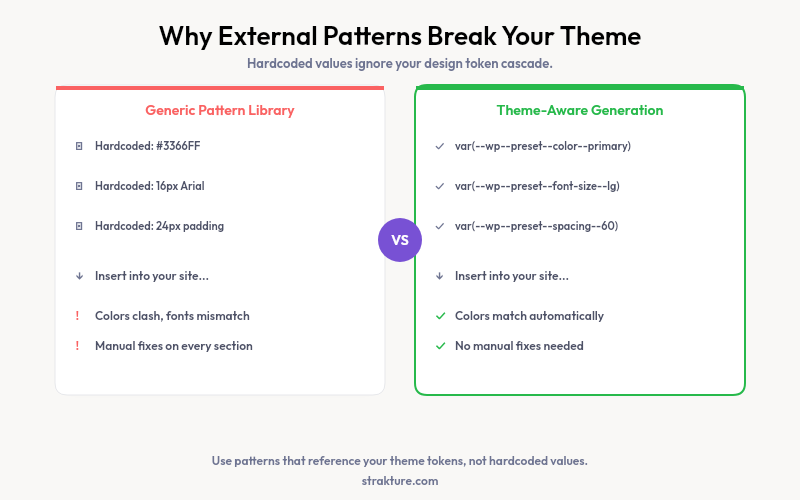
Each value becomes a CSS custom property WordPress generates automatically. A button block doesn’t store “blue” as a literal color. It stores a reference like var(--wp--preset--color--primary). Change the primary color in Global Styles, and every element pointing to that variable updates across the site.
The official theme.json documentation covers the full schema. It’s worth reviewing before you edit block theme settings in code.
How WordPress Theme Editing Works in the Site Editor
The Site Editor’s Global Styles panel is the visual interface to theme.json. Click the styles icon in the top-right corner of the editor. Every change you make there writes back into your theme’s settings.
Set your heading font to Playfair Display and every heading updates instantly. Switch your primary color from blue to forest green and buttons, links, and accent elements all shift together. That cascade is the entire point of a token-based system.
Block themes with detailed theme.json files give you the most control. Kadence, Neve, Blocksy, Astra, and GeneratePress all expose rich token sets through the Global Styles interface. Classic themes without theme.json require CSS edits or a child theme to achieve the same results.
According to the WordPress performance team, design tokens in theme.json reduce total CSS output by an average of 35% compared to classic theme approaches that duplicate style declarations across templates.
On a block theme, non-developers can make sweeping design changes safely. On a classic theme, those same changes carry a real risk of breaking something that isn’t easy to undo.
Where Customization Breaks: External Patterns and Hardcoded Styles
You insert a hero section from a pattern library. The preview looks polished. But on your site the heading renders in the wrong font, the button color doesn’t match your brand, and the padding fights your layout.
This happens because most pattern libraries ship hardcoded styles. They bake in hex codes, pixel values, and font names rather than referencing your theme’s CSS custom properties. Your site carries one visual language. The pattern carries a different one.
The WordPress.org pattern directory targets broad compatibility over precision. Patterns there work well on default themes. On a Blocksy or Kadence setup with a custom palette, nearly every external pattern needs manual correction after insertion.
Inline style overrides compound the problem over time. Each fix creates an exception that bypasses your token cascade. Fifty pages in, you may have dozens of values with no connection to your actual theme settings.
What a Token-Aware Approach Looks Like
The fix isn’t to avoid patterns. It’s to use patterns that read your tokens before generating output.
Strakture is a WordPress plugin that generates AI-powered FSE block patterns matched to your active theme’s what a WordPress design system actually is. It extracts your color palette, typography scale, spacing rules, and layout conventions from your installation. Generated patterns reference those values through your CSS custom properties instead of hardcoding their own.
A hero section built for a Kadence site with a dark palette looks completely different from the same pattern on a Neve site with pastels. The output adapts to whatever tokens your theme defines. Colors, fonts, and spacing arrive aligned from the first insert.
Working With WordPress Theme JSON Directly
For developers, editing theme.json directly gives precision the visual editor can’t always match. You can define custom spacing tokens, register font size presets, and control which Global Styles options editors can access.
A spacing scale with tokens like --wp--preset--spacing--30 through --wp--preset--spacing--80 gives consistent increments across every block. Define them once and they’re available everywhere. The settings reference in the WordPress theme docs lists every configurable property.
User edits in Global Styles don’t modify theme.json itself. They’re stored separately in the database as style variations. You can revert all customizations by resetting Global Styles without touching the theme code.
Keep Your Design Consistent as the Site Grows
A five-page site stays consistent with minimal effort. Scale to twenty pages and friction builds fast. (See our WordPress redesign checklist for managing this at scale.). Three practices help:
- Avoid inline color overrides. If a color you need isn’t in your palette, add it to Global Styles first. It becomes part of your system rather than a one-off exception.
- Use synced patterns for repeated sections. Headers, footers, and CTAs that appear on multiple pages should be synced. Edit once, update everywhere.
- Source patterns that reference your tokens. Strakture reads your theme data and generates sections that match your design decisions without requiring post-insertion corrections.
Theme customization only saves time when everything you add respects the rules you set. Patterns that ignore your tokens quietly undo that consistency.
If you build on a block theme and want new sections that match from the first insert, start with the WordPress.org theme directory filtered to Full Site Editing, then test a pattern generator that reads your tokens rather than shipping fixed styles.
What is the difference between a block theme and a classic theme for customization?
Block themes include a theme.json file that stores design tokens in one structured location. The Global Styles panel in the Site Editor lets you adjust those tokens without writing code. Classic themes store styles in scattered CSS files, and changes typically require developer edits or a child theme.
What is theme.json and do I need to edit it manually?
Theme.json is the configuration file in block themes that defines your color palette, typography presets, spacing scale, and layout defaults. Most site owners never touch it directly. The Global Styles panel writes changes to the database, leaving the theme file intact. Developers can edit it to expose more options or lock down settings for client sites.
Why do inserted block patterns look different from the rest of my site?
Most patterns from external libraries hardcode their own colors, fonts, and spacing. They don’t read your theme’s CSS custom properties or Global Styles settings. On insertion, the pattern brings its own visual language rather than adopting yours. Using patterns generated from your actual theme tokens removes that disconnect.
Can I customize a free WordPress theme without coding?
Yes, if the theme supports Full Site Editing. Free block themes like Kadence, Astra, and Neve expose color, typography, and spacing controls through the Site Editor with no code required. The depth of options depends on how many design tokens the theme’s theme.json file defines.

Leave a Reply