
What “AI Website Builder Plugin for WordPress” Actually Means
Searching for an ai website builder plugin for wordpress returns dozens of tools that do very different things. Some generate entire sites from a single prompt. Others write blog posts. A few focus on individual page sections. The label “AI builder” covers all of them, which makes choosing the right tool harder than it should be.
According to W3Techs, WordPress powers 43.5% of all websites on the internet as of 2026, making it the most common platform for AI tools to target. That dominance explains why the market for AI WordPress plugins has exploded, and why the quality gap between tools is so wide.
This guide breaks the category into three distinct types. For a broader look at what AI covers across the full WordPress stack, see our guide to building a website with WordPress. You will learn what each type actually produces, where it falls short, and which approach fits your project. By the end, you will have a clear framework for picking the right tool instead of guessing based on marketing copy.
Three Categories of AI WordPress Tools
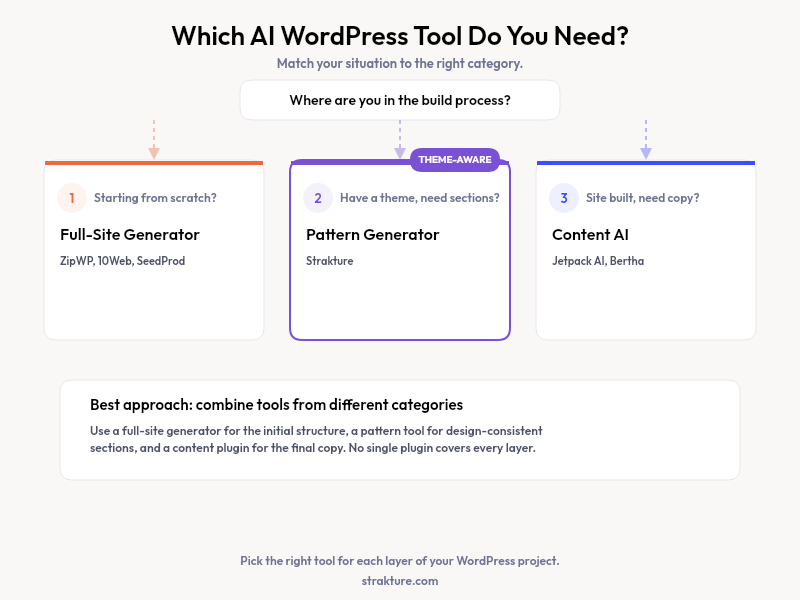
Every tool marketed as an “AI website builder” falls into one of three buckets. Understanding the differences saves you from buying a product that solves the wrong problem.
1. Full-Site Generators
These plugins create an entire WordPress site from a text prompt. You describe your business, pick a style, and the tool produces pages, menus, and placeholder content. ZipWP and 10Web are popular examples. They work best for people starting from zero who need something live quickly.
The tradeoff is control. Full-site generators pick your theme, set your colors, and decide your layout hierarchy. If you already have a brand identity or a theme you like, these tools often overwrite those choices. Customizing the output after generation can take as long as building from scratch.
2. AI Content Writers
Content-focused plugins generate text inside the block editor. They write headlines, paragraphs, product descriptions, and meta tags. WordPress.com recently added an AI Assistant that works this way. These tools handle words, not design.
They are useful for drafting copy faster. But they will not build a hero section, create a pricing table, or arrange columns with images. If your bottleneck is layout rather than writing, a content generator will not solve it. You would still need a separate tool for visual structure.
3. AI Pattern and Section Generators
This category sits between the other two. Pattern generators create individual block sections (hero areas, feature grids, testimonial rows, CTAs) that you insert into existing pages. They do not touch your global settings, menus, or theme configuration.
Block patterns are a core WordPress concept. AI pattern tools automate the design process for these sections while leaving everything else in your hands. Strakture falls into this category. It reads your active theme’s color palette, typography, and spacing rules, then generates patterns that match those settings out of the box.
How the Three Types Compare
| Feature | Full-Site Generators | AI Content Writers | Pattern-Level Generators |
|---|---|---|---|
| What it builds | Entire site from a prompt | Text content for pages/posts | Individual section layouts |
| Theme awareness | Low — uses own templates | None — text only | High — reads your theme.json |
| Design token support | Rarely | N/A | Yes (best tools) |
| Output format | Proprietary or generic HTML | Raw text / blocks | Native WordPress blocks |
| Editing after generation | Often limited | Full control | Full control |
| Examples | ZipWP, 10Web AI, Jetwizard | Jetwizard, Jetwizard, Jetwizard | Strakture, suspended |
| Best for | Quick prototypes, MVPs | Blog content, product descriptions | Production sites with existing themes |
Why Most AI Builders Ignore Your Theme
Here is a frustration many WordPress users share: you spend hours configuring a theme, then an AI tool generates content that clashes with everything you set up. This happens because most full-site builders apply their own design tokens. They do not reference the CSS variables or theme.json values your theme already defines.
Research from the Nielsen Norman Group shows that design consistency — which theme-aware AI tools preserve — increases user trust by up to 30% compared to visually inconsistent interfaces. When an AI builder ignores your theme, it is not just an aesthetic inconvenience; it can measurably erode the credibility your design was built to establish.
The result is extra work. You generate a section, then manually adjust fonts, colors, and spacing to match the rest of your site. For sites running polished themes like Kadence, Neve, Blocksy, or Astra, that defeats the purpose of picking a well-designed theme in the first place.
Pattern-level generators that read your active theme avoid this mismatch. Strakture, for example, maps CSS variables from 15+ popular themes so generated sections use the correct heading font, button color, and container width without manual fixes.
Choosing the Right AI WordPress Page Builder Plugin
Your decision depends on where you are in the build process and what kind of help you need. The following questions will narrow it down.
A 2025 survey by WP Engine found that 67% of WordPress developers have experimented with AI tools for site building, though only 23% use them in production workflows. The gap suggests that most tools still require too much post-generation cleanup to be practical for professional use, which makes choosing the right category even more important.
- Starting from nothing? A full-site generator like ZipWP or 10Web gets you live fast. Expect to rework the design later.
- Need copy but not layout? An AI content writer handles text. Pair it with your page builder for structure.
- Have a theme you like and want matching sections? A pattern generator adds new sections that respect your existing design system.
- Running a client project with brand guidelines? Pattern-level tools keep the brand intact. Full-site generators often override it.
No single tool covers every scenario. Plenty of WordPress professionals combine a content writer with a pattern tool, or start with a full-site generator and refine later with section-level AI.
What to Check Before Installing Any AI Builder
Marketing pages for these plugins tend to overpromise. Before committing, verify a few things.
- Block editor compatibility: Does the tool output native WordPress blocks, or does it require a proprietary builder? Native blocks mean your content stays portable if you switch tools later.
- Theme awareness: Will generated output match your current colors and fonts, or will you need to restyle everything?
- Credit or usage limits: Most AI-powered plugins charge per generation. Understand the pricing model before your trial runs out.
- Image licensing: If the tool includes stock photos, confirm they are royalty-free for commercial use.
Reading the WordPress plugin directory reviews for any tool on your shortlist is also worth a few minutes. Real user feedback surfaces problems that demos hide.
Build With AI That Respects Your Design
The best ai website builder for wordpress is the one that fits your workflow and does not fight your existing choices. Full-site generators work well for quick launches. Content writers speed up copywriting. And pattern generators like Strakture fill a gap that the other two miss: producing theme-matched sections you can drop into any page without reworking the design.
If you already have a WordPress theme you are happy with, consider whether you need a tool that replaces your setup or one that builds on top of it. For most site owners adding pages to an established brand, the pattern-level approach saves time and keeps the design consistent. Try browsing a few options with free tiers before committing to a paid plan.
Can an AI plugin build my entire WordPress site automatically?
Full-site generators like ZipWP and 10Web can produce a complete site from a short description. The output typically includes placeholder content, basic pages, and a starter theme. You will still need to refine the copy, swap images, and adjust styling to match your brand. Think of it as a detailed starting point rather than a finished product.
Do AI-generated blocks work with any WordPress theme?
Blocks built on the native WordPress editor are compatible with most modern themes. However, whether they visually match your theme depends on the tool. Generic generators output blocks with hardcoded colors. Theme-aware tools like Strakture read your active theme’s design tokens so the blocks look consistent from the start.
How much does an AI WordPress builder cost?
Prices range widely. Free tiers usually let you browse templates or run a limited number of generations. Paid plans start around $19 per month for pattern-level tools and run up to $240 per year for full-site builders like SeedProd. Most charge based on the number of AI generations rather than a flat rate.
Will AI-built pages hurt my SEO?
Google does not penalize AI-generated content as long as it is helpful and original. The risk comes from publishing generic placeholder text without editing it. Always review headings, meta descriptions, and body copy before going live. Clean markup from native blocks also helps search engines parse your page structure correctly.

Leave a Reply