
You can make a WordPress landing page without installing a single page builder plugin. The block editor has had the tools to do this for years. Most guides skip straight to Elementor or Beaver Builder, but those add bloat, licensing costs, and an extra interface to learn.
Block themes handle landing pages natively. With Full Site Editing, a blank template, and the right browse block patterns by section type, you can build a focused landing page that loads fast and looks like it belongs on your site. This guide walks through the whole process.
How to Make a WordPress Landing Page in the Block Editor
Landing pages need one thing: no distractions. No header navigation, no footer links. Just the offer and a call to action. The block editor gets you there through custom page templates. Here is the process.
Step 1: Create a Blank Page Template
Open the Site Editor under Appearance in your WordPress dashboard. Go to Templates, then click Add New Template. Choose “Custom Template” and name it “Landing Page.” Leave it blank to strip the header and footer. Then open any page, switch to that template from the template panel on the right, and the page is isolated from your site’s global layout.
Step 2: Build Your Sections with Block Patterns
You do not need to build from scratch. Block patterns are pre-built section layouts you can insert in one click. Use them for your hero, feature list, testimonials, and call-to-action.
Open the block inserter and switch to the Patterns tab. WordPress ships with dozens of built-in options organized by category. Pick a hero, a testimonials row, and a CTA footer. That covers most landing page structures.
Step 3: Adjust Content and Colors
Replace placeholder text and images in each pattern. Use your theme’s predefined color palettes for text and button colors so the page stays consistent. The Group block controls padding and margin for each section, so check spacing between sections before publishing.
Why Block Themes Are Built for Landing Pages
Most people do not realize how much control FSE block themes give you out of the box. If you are still running a classic theme with a page builder bolted on, you are fighting the CMS instead of working with it.
Block themes use theme.json to define your design system: color palettes, font sizes, spacing scale, and layout widths. Every block pulls from those values automatically. A landing page built this way inherits your entire design system. No CSS overrides needed.
Page builders store content in shortcodes or proprietary post meta. Switch builders and you lose your content. Blocks live as plain HTML comments in the post, so they survive plugin changes without breaking.
Performance Differences That Matter
Page builders load their own CSS frameworks, JavaScript libraries, and sometimes icon fonts on every page. A native block landing page adds nothing extra to the page weight. Core blocks are already part of WordPress.
Google’s Core Web Vitals score reflects loading speed. Leaner pages rank better and convert better. The block editor gives you a head start on both.
WordPress Landing Page Templates: Patterns That Match Your Theme
Here is where most block-editor landing pages break down. You find a pattern that looks great in the preview, insert it, and suddenly the fonts are wrong, the button color is off, and the spacing does not align with your site.
Generic pattern libraries do not read your theme. They ship one fixed design and expect you to adjust it. For a quick demo site, that is fine. For a real campaign landing page, you need something closer to your brand from the start.
Strakture takes a different approach. It is a WordPress plugin that reads your theme’s design system before generating anything: color palette, typography scale, spacing tokens, and layout conventions. The patterns it produces look like they belong on your site. Open the library from the block editor toolbar, pick a section type, and get a pattern tuned to your theme. It supports Kadence, Neve, Blocksy, Astra, and more.
Setting Up Your Landing Page for Conversions
A landing page that loads fast but does not convert is just a fast page. Section structure matters as much as visual design. Here is what every effective landing page needs:
Unbounce’s 2025 Conversion Benchmark Report found that the median landing page conversion rate across industries is 4.3%, with pages loading under 3 seconds converting at nearly double that rate.
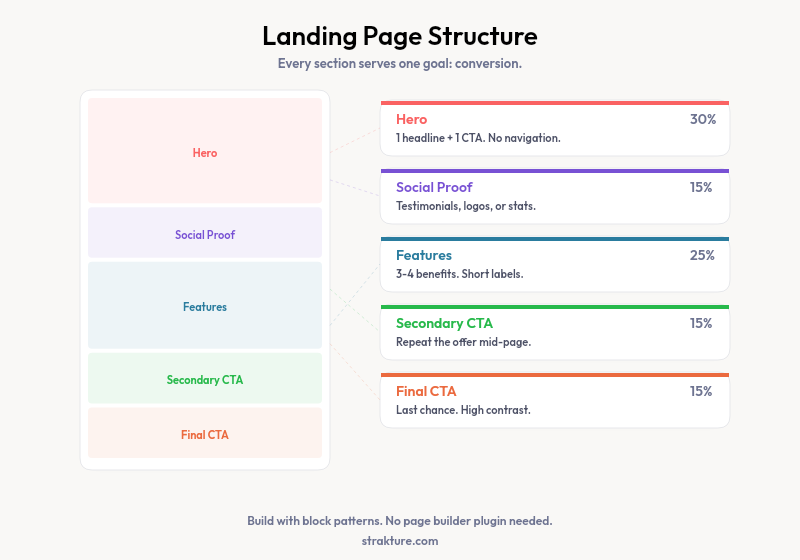
- Hero section: One headline, one sub-headline, one primary call to action. No navigation menu.
- Social proof: Testimonials, client logos, or a stat your audience trusts. Place this above the fold when possible.
- Features or benefits block: Three to four points. Short labels, brief descriptions. No long paragraphs.
- Secondary CTA: Repeat the offer mid-page and again at the bottom. Visitors who scroll that far are warmer leads.
HubSpot research shows that companies with 30+ landing pages generate 7x more leads than those with fewer than 10.
Block patterns let you drop in each section instantly. You focus on copy and images, not layout.
Removing the Header and Footer
Navigation menus give visitors an exit route. Use the blank template you created to remove them. If your theme does not support the Site Editor, check whether it offers a “Blank” or “No Header/Footer” option in the page attributes panel. Some FSE themes also ship a dedicated landing page template you can use instead.
Adding a Form to Capture Leads
WordPress does not include a native form block. You will need a lightweight plugin for lead capture. WPForms Lite and Formidable Forms both have free tiers and output clean HTML that works well inside block layouts. Keep the form short: name and email covers most top-of-funnel needs.
Build Better Landing Pages, Faster
The block editor gives you everything you need: template control, design system consistency, fast page weight, and a content format that does not break when you swap plugins. The gap most people hit is finding patterns that fit their theme without hours of manual adjusting.
If you are spending time tweaking inserted patterns to match your brand, Strakture handles that step automatically. It generates sections based on your theme’s actual design values, so you start closer to a finished page.
Can you make a landing page in WordPress without Elementor?
Yes. WordPress 6.5 and above handles landing pages without page builder plugins. Create a blank custom template in the Site Editor, then build sections with block patterns from the inserter. The result loads faster than any page builder alternative.
What is the best way to create a landing page on WordPress for free?
Use a free FSE theme like Twenty Twenty-Four, create a blank template in the Site Editor, and build sections with block patterns. No paid plugins needed. Strakture has a free plan for browsing and inserting original patterns if you want theme-matched options without manual adjusting.
Do WordPress landing page templates work with any theme?
Custom page templates work reliably with FSE block themes. Classic themes may offer a “Blank Page” option, but full template editing is not available. For complete landing page control, a block theme is necessary.
How do I make my WordPress landing page load faster?
Build with native core blocks rather than page builder plugins. Each extra plugin adds CSS and JavaScript on every request. Compress your images, use a fast FSE theme, and add WP Super Cache or a similar caching plugin. Block-based pages carry less overhead by default.

Leave a Reply