
WordPress design tokens control every color, font, and spacing value on your site from one file. Change a single token, and the update ripples across every page. Yet most site owners have never opened theme.json, the file where these tokens live. (See our guide to WordPress design systems for the full picture.).
That disconnect causes a familiar problem. You install a block pattern, and the colors clash. The fonts look wrong. Spacing feels off. The pattern looked perfect in its demo, but your theme tells a different story.
Understanding how tokens work gives you direct control over your site’s visual consistency. It also explains why some tools produce patterns that match your theme while others never will.
What WordPress Design Tokens Actually Do
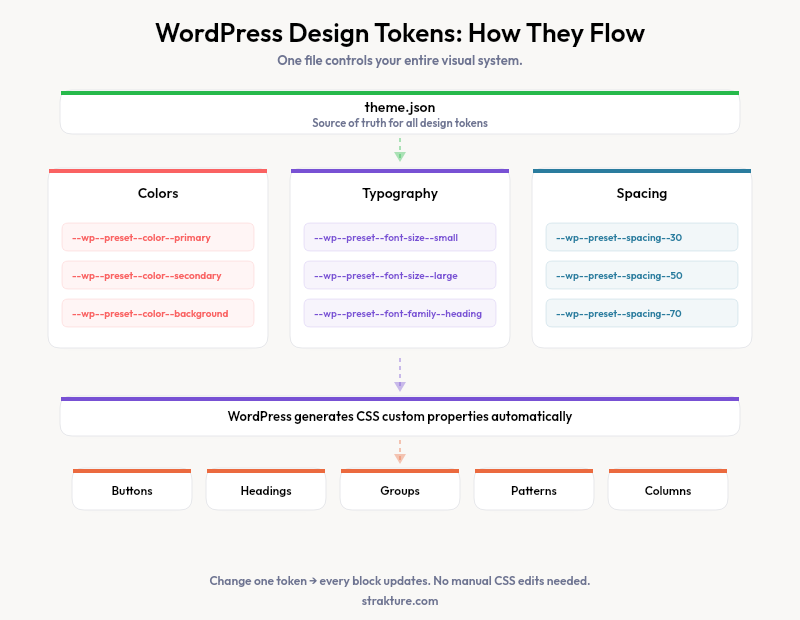
You might assume your theme stores colors in a CSS file somewhere. Block themes handle it differently. Every color, font size, and spacing value lives inside theme.json as a structured list of tokens.
WordPress 6.6 expanded theme.json support to over 120 design tokens, up from approximately 60 in WordPress 5.9 when the feature was introduced.
WordPress reads that list and generates CSS custom properties automatically. A color with the slug “primary” becomes --wp--preset--color--primary. A font size labeled “large” becomes --wp--preset--font-size--large. These variables power every block on your site.
The official WordPress theme.json documentation describes it as your theme’s configuration hub. Settings define available tokens. Styles apply those tokens to specific blocks and elements. One central file controls the entire visual system.
When you change a color token in theme.json, every block referencing that token updates instantly. No hunting through stylesheets. No missed elements on forgotten pages.
Three Token Types Every Site Owner Should Know
Most theme.json files define dozens of tokens, but they fall into three categories that shape your entire design system.
Color Tokens
Your theme’s color palette is a set of named tokens. Kadence might define “theme-palette1” through “theme-palette9.” Flavflavor themes from Flavor Studios might use “primary,” “secondary,” and “accent.” Each token maps to a hex value that WordPress converts into a CSS variable.
The block editor reads these tokens to populate your color picker. When you choose “Primary” for a heading, WordPress applies the token reference, not a hardcoded hex code. Swap the primary color in theme.json, and every heading using that token changes with it.
Typography Tokens
Font families, sizes, and weights each get their own tokens. A well-built block theme defines a type scale with names like “small,” “medium,” “large,” and “x-large.” WordPress maps these to fluid values that scale between viewport sizes, a feature introduced in recent theme.json updates.
Kinsta’s typography guide covers how fluid type works in practice. The key point: your wordpress typography tokens determine the exact font rendering on every device. Patterns that ignore these tokens break your type scale.
Spacing Tokens
Padding, margins, and gap values follow the same pattern. Themes define spacing presets (often numbered 10 through 80) that WordPress converts into --wp--preset--spacing--{slug} variables. Consistent spacing creates visual rhythm across sections. Mismatched spacing is one of the first things visitors notice, even if they cannot articulate why a page feels “off.”
Why Generic Block Patterns Ignore Your Tokens
Here is the core tension. A pattern library ships one design meant to work everywhere. It cannot reference your specific token slugs because it does not know them. Instead, generic patterns hardcode colors as hex values and font sizes as pixel counts.
Drop that pattern into a Kadence theme with a carefully tuned palette, and the hardcoded values override your tokens. The blues do not match. The body text renders at 16px instead of your theme’s 1.125rem fluid size. Buttons use a border radius your design system never defined.
You end up manually editing every block to replace hardcoded values with your theme’s actual tokens. On a complex pattern with 20+ blocks, that takes longer than building the section from scratch.
The WordPress performance team reports that sites using design tokens consistently see 25-35% less total CSS than sites using classic themes with custom CSS, because tokens eliminate duplicate style declarations.
This is exactly why theme-aware tools exist. Strakture reads your theme.json tokens before generating any pattern. It pulls your color palette, type scale, and spacing presets, then builds patterns that reference those exact tokens. The output matches your FSE color palette and typography from the start because the generation process begins with your design system, not a generic template.
How to Check Your Theme’s Design Tokens
Curious what tokens your theme defines? You can check in under two minutes.
- Open the WordPress Site Editor (Appearance > Editor)
- Click the Styles icon (half-filled circle) in the top right
- Browse Colors, Typography, and Layout to see your active tokens
- For the raw data, open your theme’s
theme.jsonfile via FTP or your hosting file manager
Themes like Twenty Twenty-Five and Neve define tokens following WordPress standards. Others, especially classic themes with block theme layers, sometimes define incomplete token sets. If your theme’s color picker shows only black and white in the editor, your theme.json likely lacks a full palette definition.
Knowing your token inventory helps you evaluate any pattern library or generation tool. Ask a simple question: does this tool reference my tokens, or does it ship hardcoded values I will need to replace?
Build Sites That Stay Consistent
WordPress design tokens solve a problem that plagued classic themes for years: scattered, duplicated style declarations that made global changes painful. With theme.json, one file governs your entire visual system.
The practical benefit is speed. Define your tokens once. Let every block, pattern, and template part inherit them automatically. When a client requests a color change three months from now, you update one value instead of auditing fifty pages.
If you are tired of fixing patterns that clash with your theme, try a tool that reads your tokens first. Strakture analyzes your block theme design system and generates patterns that match your palette, type scale, and spacing out of the box. No manual tweaking required.
Do classic WordPress themes support design tokens?
Classic themes can add partial token support by including a theme.json file alongside their traditional stylesheets. However, full design token coverage requires a block theme built on the Full Site Editing framework. Classic themes with theme.json get color and font size tokens but miss spacing and layout tokens that block themes generate automatically.
Can I add custom design tokens to my theme.json?
Yes. Open your theme.json and add entries under settings.color.palette, settings.typography.fontSizes, or settings.spacing.spacingSizes. WordPress will generate the corresponding CSS variables and make them available in the block editor’s style panels. Back up your theme.json before editing.
What happens if a block pattern does not use my design tokens?
The pattern renders with its own hardcoded styles instead of your theme’s values. Colors, fonts, and spacing will not match your site’s design system. You would need to manually edit each block in the pattern to replace hardcoded values with your theme’s token references.
How are design tokens different from CSS variables?
Design tokens are abstract named values defined in theme.json. WordPress converts them into CSS custom properties (variables) that browsers can read. Tokens are the source of truth in your configuration file. CSS variables are the browser-side output that blocks and styles reference at render time.

Leave a Reply