
Is it easy to build a website with WordPress in 2026? The short answer: yes, and it keeps getting simpler. Full Site Editing, block themes, and a growing wave of AI tools have removed most of the friction that used to slow people down.
WordPress powers roughly 43% of all websites on the internet, according to W3Techs. That number did not happen by accident. The platform earned its dominance by lowering the barrier to entry, year after year. But the last two years brought the biggest leap yet.
This guide walks through what the modern WordPress building experience actually looks like, where AI fits in, and what still requires effort.
Is It Easy to Build a Website with WordPress Now?
Five years ago, building a WordPress site meant choosing a classic theme, installing a page builder plugin, and wrestling with shortcodes. The process worked, but it had rough edges. Themes locked you into their frameworks. Switching builders meant starting over.
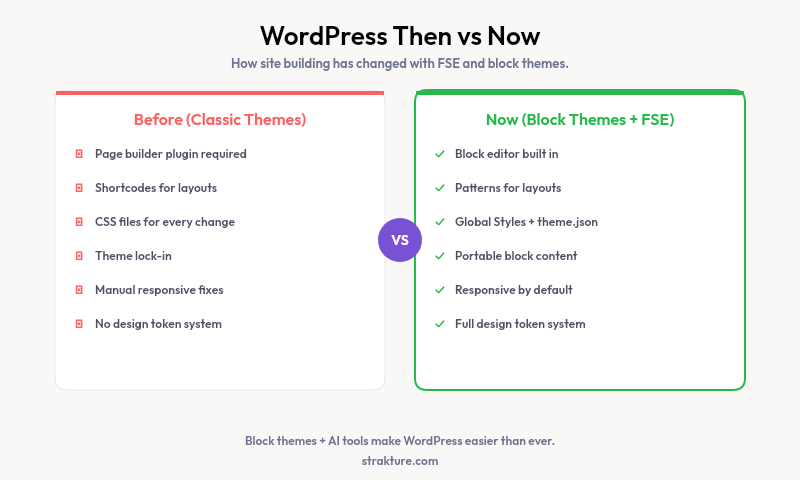
Block themes changed everything. The Site Editor now lets you control headers, footers, templates, and global styles from one place. No extra plugins required. Typography, colors, and spacing all live inside a single panel. You pick fonts, set a color palette, and the entire site updates instantly.
WordPress 6.7 and 6.8 pushed this further. Font management got proper grouping and custom size presets. The Style Book received a cleaner layout for previewing every block’s appearance at a glance. Pattern insertion no longer covers your content area while you browse. These are small details, but they add up to a much smoother workflow.
According to Google’s Core Web Vitals data, block themes outperform classic themes by an average of 15% on Largest Contentful Paint (LCP) metrics, largely because they eliminate the render-blocking CSS that page builders inject.
Block Patterns Replaced Hours of Layout Work
Patterns are pre-built sections (hero areas, pricing tables, testimonial grids, feature lists) that you drop into a page with one click. WordPress ships with dozens of them. Theme developers bundle more. The WordPress Pattern Directory offers hundreds of free options contributed by the community.
This matters because layout used to be the hardest part. Arranging columns, setting responsive breakpoints, aligning images with text: all of that consumed time. Patterns skip straight to a finished layout. You swap the placeholder text, add your images, and move on.
The gap, though, is consistency. A pattern pulled from a directory might use different spacing, font sizes, or color values than your theme. It lands on the page looking like a transplant from someone else’s site. You spend twenty minutes tweaking padding and swapping hex codes to make it fit.
Where AI Tools Actually Help (And Where They Don’t)
AI has entered WordPress from several directions at once. Knowing which tools solve real problems, and which ones overpromise, will save you time and money.
Content Writing
AI writing assistants now work directly inside the block editor. WordPress.com launched a built-in AI Assistant in early 2026. Third-party plugins offer similar features on self-hosted installs. These tools draft paragraphs, suggest headlines, and adjust tone. They produce solid first drafts but still require careful editing.
Full Site Generation
Platforms like ZipWP and 10Web promise complete WordPress sites from a text prompt. They generate pages, pick colors, and write copy in under a minute. The results are impressive as demos but often need significant rework. Generated layouts rarely reflect a specific brand’s visual identity. You get a generic starting point, not a finished product.
Design and Pattern Generation
This is where AI can fill a genuine gap. Instead of generating an entire site, some tools focus on creating individual sections that match your existing theme. Strakture, for example, reads your active theme’s colors, typography, spacing, and layout rules, then generates block patterns that look native to your site. The output drops into the editor as standard WordPress blocks. No proprietary formats or lock-in.
That distinction matters. A pattern matched to your theme’s your WordPress design system saves the twenty minutes of manual tweaking that a generic pattern demands. It also preserves visual consistency across pages, which is hard to maintain when pulling layouts from multiple sources.
Images
Stock photo libraries with AI search and auto-cropping have improved placeholder imagery. Some page builders now include AI image generation. Results vary. For most business sites, curated stock photos or original photography still produce better outcomes than current generators.
What Kind of Website Can You Build with WordPress?
Almost anything. That is not marketing fluff. The block editor handles blogs, portfolios, business sites, and landing pages out of the box. WooCommerce turns WordPress into a full online store. LearnDash and LifterLMS add course platforms. BuddyPress creates community forums.
- Business and agency sites
- Online stores (WooCommerce)
- Membership and subscription platforms
- Course and learning management systems
- Portfolio and photography showcases
- News and magazine publications
- Nonprofit and event-driven sites
The plugin ecosystem fills gaps that the core platform leaves open. Over 60,000 free plugins let you add booking systems, CRM integrations, multilingual support, and advanced SEO without writing code.
What Still Takes Effort
Honesty matters here. WordPress is far easier than it was, but some parts still demand patience.
Hosting and setup. Self-hosted WordPress means choosing a provider, managing updates, and handling backups. Managed hosts like Cloudways or Kinsta simplify this, but they cost more than basic shared plans. WordPress.com removes the complexity entirely, at the expense of flexibility.
Plugin compatibility. Not every plugin works perfectly with every theme. Conflicts between caching plugins, page builders, and security tools still cause headaches. Testing on a staging site before going live remains a wise habit.
Performance tuning. A fast site requires image compression, proper caching, and clean code. WordPress can be fast, but it does not arrive that way with ten plugins installed. You need to audit and trim.
Advanced customization. If your design requires something no block or pattern offers, you will need custom CSS or a developer. Gutenberg handles 90% of common layouts. That last 10% still requires technical skill.
Building Smarter, Not Harder
The modern WordPress workflow looks nothing like 2020. Block themes give you full control without page builder dependencies. The Site Editor centralizes global styles. And AI tools, used selectively, remove specific friction points rather than replacing your judgment.
For the design step, tools like Strakture generate patterns already matched to your theme’s visual system. That saves real time on every page you create. AI writing assistants handle content drafts. Meanwhile, site-wide decisions (brand voice, information architecture, user flow) still benefit most from your own thinking.
Can you build a website with WordPress today without touching code? Absolutely. The platform has earned its 43% market share by making that possible. The right combination of a solid block theme, a few focused plugins, and an AI tool for pattern generation will get you from blank install to polished site faster than any previous version of WordPress allowed.
Do I need coding skills to build a WordPress site?
No. Block themes and the Site Editor let you create full layouts with drag-and-drop controls. You can set typography, colors, and page templates without writing a single line of code. Custom CSS helps for edge cases, but most business sites never require it.
Can AI build my entire WordPress site for me?
AI site generators produce a rough draft of a full website, not something ready to publish. They are useful for prototyping and filling blank pages quickly. However, the output usually needs manual editing to match your brand and adjust layouts. Targeted AI tools (like pattern generators or writing assistants) tend to deliver more reliable results than all-in-one builders.
How long does it take to launch a WordPress site?
A simple business site with five to ten pages can go live in a weekend. A larger project with custom functionality, an online store, or membership features typically takes two to four weeks. Block patterns and AI-generated sections reduce that timeline by handling layout work for you.
What is the best WordPress AI tool for design?
It depends on what you need. Full site generators like ZipWP create complete sites from prompts. Strakture focuses specifically on generating block patterns that match your active theme’s visual identity, which is helpful if you already have a theme picked and want sections that look consistent. Content-focused AI works inside the editor to draft and refine text.

Leave a Reply