
Can You Build a Website with WordPress and AI Alone?
Can you build a website with WordPress using only AI tools? The short answer is yes, partially. AI can generate layouts, write copy, and suggest design choices in seconds. But a finished, professional site still requires human decisions at every layer.
WordPress powers 43.5% of all websites globally according to W3Techs, from personal blogs to enterprise platforms like TechCrunch, The New Yorker, and BBC America.
Most articles on this topic hand you a list of plugins and call it a day. This one takes a different approach. We will break a WordPress site into four distinct layers, show what AI handles well in each, and flag where it still falls short.
By the end, you will know exactly which AI tools cover which layers and where your own judgment still matters most.
The Four Layers of Every WordPress Site
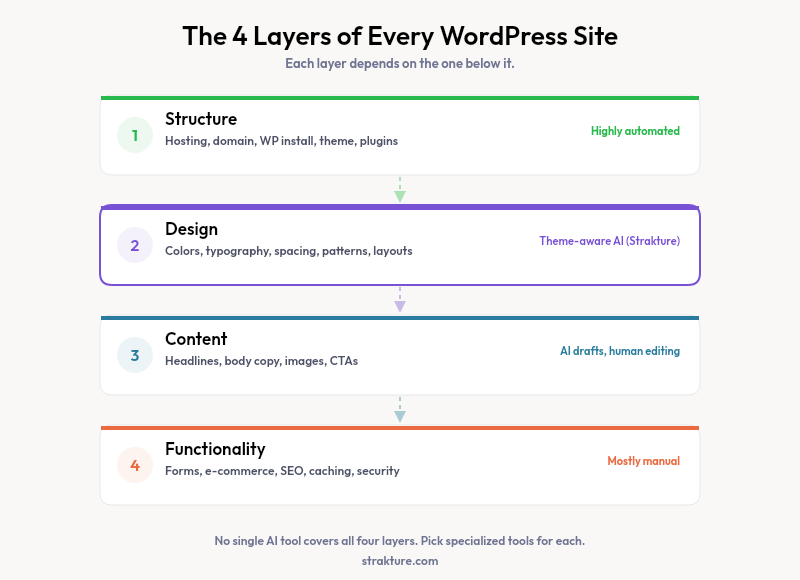
Think of any WordPress project as four stacked layers. Each one depends on the layer below it.
- Structure: Hosting, domain, WordPress installation, theme selection, and plugin setup.
- Design: Colors, typography, spacing, block patterns that match your theme, and page layouts that form your visual identity.
- Content: Headlines, body copy, images, videos, and calls to action on every page.
- Functionality: Forms, e-commerce, SEO configuration, caching, security, and integrations with third-party services.
A polished site needs all four layers working together. No single AI tool covers them all today. That matters because picking the right tool for each layer saves you time and money.
What AI Actually Handles in 2026 (Layer by Layer)
Structure
Hosts like Bluehost’s AI Site Creator now bundle WordPress installation, theme activation, and basic plugin setup into a single guided flow. You answer a few questions, and the host provisions everything. This layer is the most automated today because the steps are predictable.
The trade-off? You lose flexibility. AI-guided setup often locks you into one hosting provider’s ecosystem and a narrow set of theme options.
Design
This is where things get interesting. WordPress.com’s AI Website Builder generates full page layouts from a text prompt. Elementor AI creates sections inside its drag-and-drop editor. These tools produce usable starting points, but the output often looks generic because the AI does not analyze your specific theme’s design system.
Strakture takes a different approach to this layer. Instead of generating entire sites, it reads your active theme’s color palette, typography scale, and spacing tokens. Then it produces Full Site Editing block patterns that match those exact values. The result is patterns that look like they were hand-coded for your theme, whether you run Kadence, Astra, Blocksy, or any of 15+ supported themes.
This targeted strategy solves a real frustration. Generic patterns always need manual color and font adjustments after insertion. Theme-aware generation skips that step entirely.
A 2025 WordPress.com survey found that first-time users can launch a basic site in under 30 minutes with a block theme, compared to the 2-3 hours typical with classic themes five years ago.
Content
AI copywriting has matured fast. The WordPress AI Assistant works inside the block editor to draft paragraphs, rewrite headlines, and adjust tone. Standalone tools like ChatGPT produce long-form drafts in seconds.
The gap is brand voice. AI can write grammatically correct copy that sounds like everyone else. Making it sound like you requires editing, prompt refinement, and clear style guidelines. Plan to revise every AI-generated paragraph before publishing.
Functionality
This layer has the least AI coverage. Setting up WooCommerce, configuring a caching plugin, or connecting a CRM demands hands-on work. A few code-generation tools (like the Claude Cowork plugin) can scaffold custom blocks or write PHP snippets. But testing, debugging, and security review remain human tasks.
If your site needs complex functionality, budget time for careful setup regardless of which AI tools you adopt.
Why No Single AI WordPress Builder Does It All
Every tool performs best at one or two layers. WordPress.com’s builder handles structure and basic design. Elementor AI focuses on design and content within its page builder. Theme-aware pattern generators fill the visual gap. WordPress’s own AI Assistant targets content creation inside the editor.
Expecting one tool to master every layer leads to disappointment. The smarter strategy is to pick a specialized tool per layer and let them complement each other. A typical stack might look like this: managed hosting for structure, a design-token-aware pattern tool for visuals, an AI writing assistant for content, and manual setup for functionality.
This layered approach also protects you from vendor lock-in. If a better content tool appears next month, swap it without touching your design or hosting stack.
A Practical Workflow for AI-Assisted Site Building
Here is a step-by-step workflow that combines AI with human judgment at every stage.
- Choose hosting and install WordPress. Use an AI-guided host or set up manually through a provider like the official WordPress installation guide.
- Pick a block theme. Select one that matches your brand direction. AI cannot make this creative decision for you.
- Generate design patterns. Use a tool like Strakture to produce section patterns (heroes, feature grids, testimonials) that respect your chosen theme’s design tokens.
- Draft page content. Feed your brand guidelines into an AI writing tool. Review and edit every draft before publishing.
- Add functionality manually. Install forms, analytics, e-commerce, and SEO plugins. Test each one after activation.
- Review the full site. Check mobile responsiveness, page speed, and accessibility. AI does not reliably audit these areas yet.
Following this order prevents rework. Design decisions made before content creation give your copywriter (human or AI) clear visual constraints to write within.
Where AI Falls Short (Be Honest About the Gaps)
AI-generated sites often share a few common problems. Recognizing these early saves hours of fixes later.
- Generic visuals. Without theme awareness, AI output looks like a template. Visitors notice.
- Bland copy. AI drafts are grammatically sound but lack personality. Every brand sounds the same without heavy editing.
- Missing accessibility. Most builders skip proper heading hierarchy, alt text, and keyboard navigation support.
- Weak functionality. Forms, payment flows, and third-party integrations require direct setup and testing.
These are not reasons to avoid AI. They are reasons to pair it with your own review process. AI handles the first 70% of the work. You handle the 30% that makes a site feel professional and trustworthy.
Build Smarter, Not Faster
Can you build a website with WordPress using AI? Yes. Can AI do all of it well? Not yet. The most effective approach is layered: pick the right tool for structure, design, content, and functionality separately.
For the design layer specifically, Strakture produces patterns matched to your current theme’s colors, fonts, and spacing. It handles one layer well instead of promising to handle all four poorly. That honest scope is what makes it useful.
Start with the layer that matters most to your project and add AI tools one at a time. You will build a better site than any single “do everything” builder could produce on its own.
Is there a free AI website builder for WordPress?
Several free options exist. The WordPress.com builder is available on its free tier with limited features. ZipWP offers a free plan that generates complete starter sites. Most plugin-based builders (SeedProd, Elementor) include free versions with basic AI features and paid upgrades for advanced generation.
Can AI replace a web designer for WordPress sites?
Not fully. AI produces solid first drafts of layouts and copy. But brand strategy, accessibility audits, conversion rate testing, and custom functionality depend on human expertise. Think of AI as a skilled assistant that speeds up production work while you direct the creative and technical decisions.
What is the best AI-powered WordPress website builder?
There is no single best option because each tool targets different layers. The WordPress.com site creator covers structure and layout. Elementor AI works within its visual builder ecosystem. Design-focused pattern tools address visual consistency. Pick based on which part of your site needs the most help.

Leave a Reply