
Choosing the best Gutenberg blocks plugins for your WordPress site can feel like scrolling through an endless app store. Over 264 million posts have been created with the block editor, and the plugin ecosystem has grown to match that scale. But more options does not mean better options.
This guide organizes the top Gutenberg block plugins by what you actually need them for. Instead of ranking 20 plugins in a flat list, you will find them grouped by use case: layout, design, content, AI generation, and specialty blocks. Each section covers block counts, free vs. premium features, and who benefits most.
Whether you are building client sites on a deadline or launching your first blog, the right block plugin depends on the type of work you do. Here is how to find the one that fits.
Best Gutenberg Blocks Plugins Compared at a Glance
Before exploring each plugin in detail, this comparison table highlights the key differences. Use it to narrow your shortlist fast, then read the full breakdown for any plugin that catches your attention.
| Plugin | Blocks | Free Tier | Pro From | Best For | Performance | AI Features |
|---|---|---|---|---|---|---|
| Kadence Blocks | 20+ | Yes | $119/yr | All-around page building | Light | Yes (AI blocks) |
| GenerateBlocks | 9 | Yes | $99/yr | Developers, speed-focused sites | Minimal | No |
| Stackable | 42+ | Yes | $49/yr | Design-heavy sites, FSE | Light (~11kb CSS) | No |
| Spectra | 35+ | Yes | $69/yr | Marketing pages, WooCommerce | Moderate | Yes (content AI) |
| CoBlocks | 33+ | 100% Free | N/A | Budget-friendly sites | Moderate | No |
| Getwid | 40+ | 100% Free | N/A | Template-based designs | Light | Yes (AI assistant) |
| Ultimate Blocks | 25+ | Yes | $49/yr | Bloggers, content marketers | Light | No |
| Essential Blocks | 50+ | Yes | $39/yr | Large block library needs | Moderate | Yes (content + images) |
| GutenKit | 65+ | Yes | $45/yr | Mega menus, dynamic content | Moderate | No |
| BlockArt | 29+ | Yes | TBD | Starter sites, beginners | Light | No |
| Strakture | Patterns | Yes (browse) | $19/mo | Theme-matched AI patterns | Minimal | Yes (core feature) |
Layout and Structure Blocks
Every site starts with structure. The plugins in this category give you flexible rows, columns, grids, and containers that go far beyond what WordPress ships by default.
Kadence Blocks
Kadence Blocks is the Swiss Army knife of the Gutenberg ecosystem. The free version ships over 20 blocks, including an advanced Row Layout, Tabs, Accordion, and Form block. The Pro version ($119/year, unlimited sites) adds AI-powered blocks, dynamic content, and the full Design Library with hundreds of starter patterns.
A January 2026 update introduced a new Performance Optimizer extension that reduces render-blocking CSS. For agencies juggling multiple client sites, the unlimited license and deep customization controls make Kadence one of the most cost-effective choices per site.
Best for: Freelancers and agencies who need a single plugin to handle layouts, forms, and design controls without touching code.
GenerateBlocks
GenerateBlocks takes the opposite approach from large block libraries. It ships just 9 blocks in the free version (Container, Grid, Text, Button, Query, Image, Shape, and related loop blocks). The idea is simple: learn a few blocks deeply and build anything with them.
The Pro version ($99/year) adds site header, navigation, accordion, tabs, and carousel blocks plus 300+ design patterns. With 200,000+ active installs and a 4.9-star rating, GenerateBlocks is a favorite among developers who value clean HTML output and minimal CSS overhead. It generates only the CSS your blocks actually use.
Best for: Performance-obsessed developers and anyone building on the GeneratePress theme, though it works with any theme.
Stackable
Stackable offers 42+ blocks with a strong focus on visual design and Full Site Editing compatibility. Its Global Design System lets you define typography, colors, and spacing once, then apply them across every Stackable block on your site. Frontend CSS loads at roughly 10.7kb, keeping pages lean.
The Premium plan starts at $49/year for a single site, with lifetime options available from $189. Stackable earned a 4.9 rating across 200,000+ installs, and its conditional display and motion effects features set it apart for marketing-heavy builds. If you are looking for advanced Gutenberg blocks that still respect page speed, Stackable is worth testing.
Best for: Designers and site owners who want rich visual blocks with a built-in design system and FSE support.
Design and Visual Blocks
Structure gets your content on the page. Design blocks make it look intentional. These plugins add galleries, shape dividers, animations, and visual elements that standard WordPress blocks do not cover.
Spectra (formerly UAG)
Spectra, built by the team behind the Astra theme, provides 35+ free blocks across categories like content, posts, social, SEO, and forms. The Pro version ($69/year for 3 sites) adds a popup builder, countdown timers, dynamic content display, Instagram feeds, and WooCommerce blocks.
Spectra also includes a built-in AI feature for generating copy and customizing page layouts directly inside the editor. If you run an Astra-powered site, the integration between theme and plugin is tighter than most competing combinations. According to WordPress.org data, Spectra powers over 2 million sites, making it one of the most widely adopted Gutenberg block plugins available.
Best for: Astra theme users and marketers who need landing page blocks, popups, and WooCommerce integration in one package.
CoBlocks
CoBlocks is a fully free plugin maintained by GoDaddy with 33 distinct blocks and 300,000+ active installations. You get galleries (masonry, carousel, collage, stacked, offset), a pricing table, hero block, form builder, shape divider, and a food and drinks menu block.
The no-premium-tier model means every block ships free. That is rare. The tradeoff: updates have slowed recently, and some users report GDPR concerns with automatic Google Fonts loading. For budget-conscious projects that need solid gallery and layout blocks, CoBlocks still delivers. Just test the font loading behavior for EU compliance.
Best for: Anyone who wants a broad, free block collection for portfolios, restaurants, and content-heavy pages.
Getwid
Getwid by MotoPress provides 40+ blocks, all completely free. The collection includes sliders, counters, price lists, testimonials, progress bars, and an AI assistant block for generating content directly in the editor. Pre-designed layouts let you assemble pages quickly from templates.
Performance benchmarks show Getwid adds roughly 0.06 seconds to front-end load time and under 100kb of memory, putting it among the lighter free options. For sites that need Gutenberg blocks examples to study and adapt, Getwid ships clean, well-documented code on GitHub.
Best for: Template-driven builds and developers who want a free, open-source block collection with solid documentation.
Content and Engagement Blocks
Not every plugin focuses on page layout. Some target bloggers, content marketers, and anyone who needs blocks built specifically to drive reader interaction and conversions.
Ultimate Blocks
Ultimate Blocks ships 25+ blocks aimed squarely at bloggers and affiliate marketers. The star features include a Review block with Schema markup (great for affiliate SEO), a Table of Contents generator, star ratings, click-to-tweet, content toggle, and tabbed content.
The free version covers most use cases. Pro ($49/year) adds animations, additional styling controls, and priority support. If you publish product reviews, comparison posts, or how-to content, the built-in Schema support alone can save you from installing a separate plugin.
Best for: Bloggers publishing reviews, listicles, and how-to content who need Schema-ready engagement blocks.
Essential Blocks
Essential Blocks by WPDeveloper offers 50+ blocks spread across six categories: content, creative, marketing, dynamic, forms, and WooCommerce. The Starter plan begins at $39/year, which positions it as the most affordable premium Gutenberg blocks plugin with a large library.
Recent growth pushed active installations past 200,000. The AI feature handles both image generation and content writing inside the block editor. For users who want the widest selection of Gutenberg essential blocks without installing multiple plugins, this collection covers the most ground.
Best for: Site owners who prefer a single large library over combining multiple smaller plugins.
AI-Powered Pattern Generation
Most Gutenberg block plugins give you building blocks. You still have to assemble them, style them, and make sure they match your theme. A newer category of tools skips that manual work entirely by using AI to generate complete, ready-to-insert patterns.
Strakture
Strakture is not a block plugin in the traditional sense. It does not add new block types to the inserter. Instead, it works as a Gutenberg block generator that creates full block patterns matched to your active theme’s design system. Before generating anything, Strakture reads your theme’s colors, typography, spacing, and layout tokens. The output lands on your page looking like it was designed specifically for your site.
The free plan lets you browse and insert original patterns. Paid plans (starting at $19/month for 50 AI generations) unlock the customization prompt where you describe what you need and the AI builds it. Strakture supports 15+ popular themes including Kadence, Astra, Neve, and Blocksy, with automatic CSS variable detection for each.
This approach solves a problem the traditional block plugins listed above do not address. You can install 40 blocks, but if the patterns you build with them clash with your theme, you still spend time adjusting colors and fonts by hand.
Best for: Anyone building sites with customized FSE themes who wants patterns that match their design system without manual tweaking.
Specialized Gutenberg Blocks
Some plugins carve out a niche by going deep on features that general block libraries only scratch. These two stand out for specific use cases most others overlook.
GutenKit
GutenKit packs 65+ blocks, 20+ modules, and over 750 templates into a plugin that targets advanced builders. The standout feature is its mega menu block, which lets you create multi-level dropdown menus with custom content areas directly in Gutenberg. The query loop builder supports filtering by post type, taxonomy, meta query, and author.
Pro plans start at $45/year. A unique breakpoints module allows custom responsive breakpoints beyond the standard desktop/tablet/mobile trio, giving you six additional size options. For developers building complex directory sites or content-heavy portals, GutenKit fills gaps that lighter plugins leave open.
Best for: Developers building complex layouts with mega menus, advanced queries, and custom responsive breakpoints.
BlockArt
BlockArt focuses on simplicity. It offers 29 blocks, 52 pre-built sections, and 24 page templates with 7 full starter packs. The lightweight approach keeps frontend overhead low while providing enough variety to build a complete site from scratch.
The free version covers all core blocks. A Pro tier is available for extended features, though the plugin’s real strength is onboarding speed. New WordPress users can import a starter pack and have a finished site structure in minutes. That makes BlockArt a solid choice for first-time site builders who find 50+ block libraries overwhelming.
Best for: Beginners and small business owners who want a simple, starter-pack-driven approach to site building.
How to Choose the Right Block Plugin
With this many options, picking the wrong plugin wastes time and bloats your site. Here is a decision framework based on what actually matters.
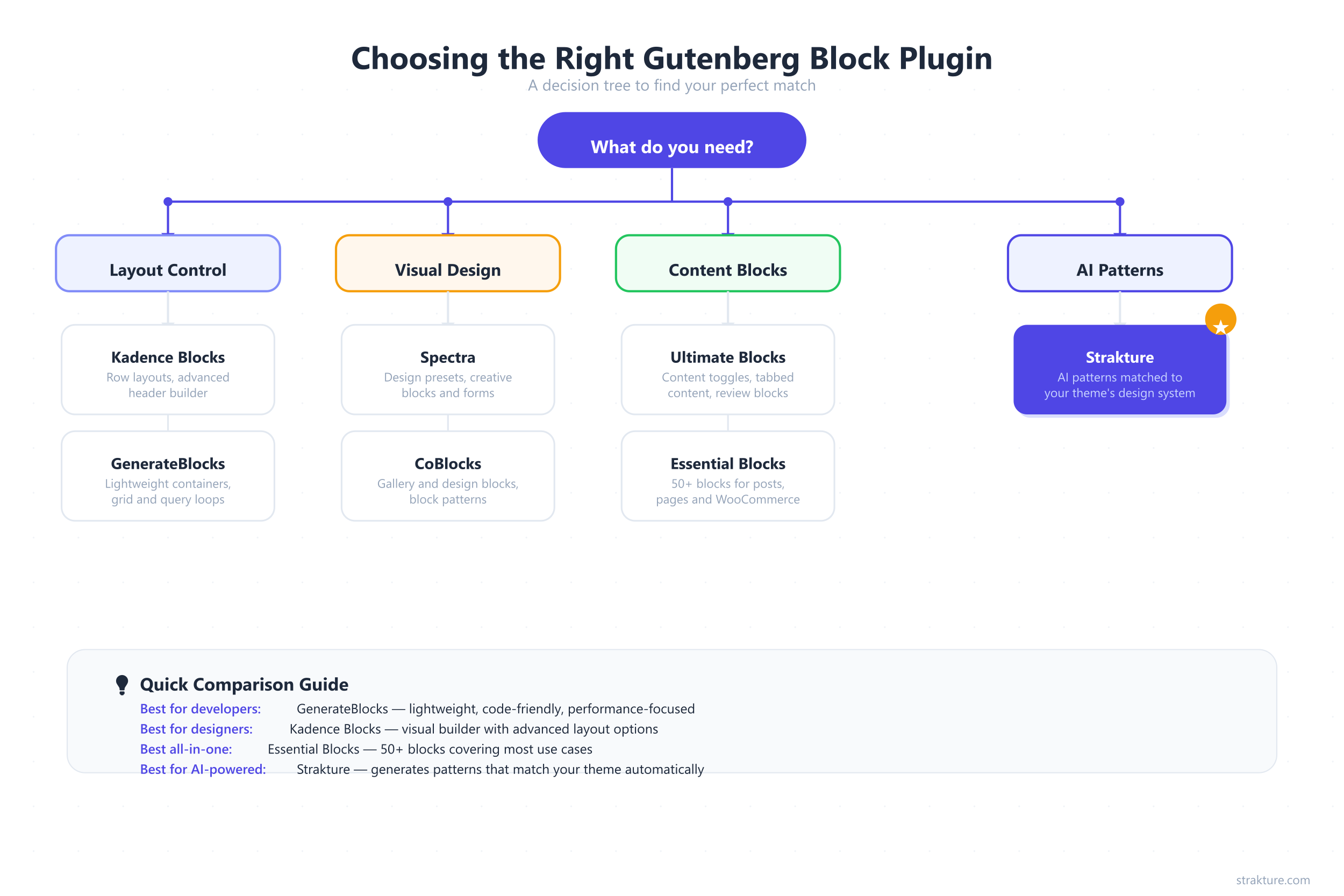
Start with your role. Developers who value clean output and performance should test GenerateBlocks or Stackable. Designers who want visual variety belong with Kadence or Spectra. Bloggers writing reviews and how-to content will get the most from Ultimate Blocks.
Count the blocks you will actually use. A plugin with 65 blocks sounds impressive, but if you only need 8, those extra 57 blocks add code your visitors download for nothing. According to WordPress developer docs, unused blocks still register scripts and stylesheets unless the plugin uses conditional loading. Fewer, deeper blocks often beat a large shallow library.
Check theme compatibility. Some plugins pair tightly with specific themes (GenerateBlocks with GeneratePress, Spectra with Astra). If you already run one of those themes, the matched plugin gives you tighter integration and fewer styling conflicts.
Test before you commit. Install the free version. Build a real page. Check your Core Web Vitals before and after. That 10-minute test tells you more than any review.
Build Faster Without Fighting Your Theme
The Gutenberg block ecosystem in 2026 is mature, competitive, and full of strong options. Kadence and Stackable lead for all-around building. GenerateBlocks wins on performance. Essential Blocks and GutenKit offer the widest selection. CoBlocks and Getwid prove you can build serious sites for free.
The gap most block plugins still leave open is design consistency. They give you building blocks but leave styling to you. If your theme has custom colors, fonts, and spacing, you end up adjusting every pattern by hand. That is where tools like Strakture fit: they generate patterns that already match your design system, so you skip the manual cleanup entirely.
Pick the plugin that matches your workflow, test it on a real page, and build something worth visiting.
Best Gutenberg Blocks Plugins FAQs
What is the best free Gutenberg blocks plugin for WordPress?
CoBlocks and Getwid are the strongest fully free options. CoBlocks offers 33 blocks including galleries, forms, and pricing tables with 300,000+ active installs. Getwid provides 40+ blocks with an AI assistant and pre-designed layouts. Both work with any theme and charge nothing for premium tiers.
Do Gutenberg block plugins slow down my site?
It depends on the plugin architecture. GenerateBlocks generates only the CSS your blocks use, adding minimal overhead. Heavier plugins with 50+ blocks can add 0.1 to 0.4 seconds to page load if they load all assets globally. Check whether the plugin supports conditional asset loading before installing.
Can I use multiple Gutenberg block plugins together?
Yes, but proceed carefully. Running two or three block plugins simultaneously can cause CSS conflicts, duplicate functionality, and slower load times. Pick one primary block plugin for layouts and structure. Add a second only if it covers a specific gap, like Schema-enabled review blocks from Ultimate Blocks.
What is the difference between Gutenberg blocks and block patterns?
Individual blocks are single elements like a heading, button, or image. Block patterns are pre-built arrangements of multiple blocks forming a complete section, like a hero area or pricing grid. Plugins like Kadence add new blocks. Tools like Strakture generate full patterns matched to your theme’s design system.
Which Gutenberg blocks plugin works best with Full Site Editing?
Stackable and Kadence Blocks both offer strong FSE compatibility, including support for template editing and global styles. GenerateBlocks also works well in the Site Editor. For AI-generated patterns designed specifically for FSE themes, Strakture reads your theme.json tokens and outputs native block patterns.

Leave a Reply