
AI WordPress block patterns are changing how designers and developers build pages. They promise to cut layout work from hours to minutes. But not every tool delivers that promise equally well.
Some tools generate full sites from scratch. Others generate individual patterns. The difference matters more than most people realize. This post covers both approaches honestly, including where AI still falls short.
According to a 2025 Stack Overflow Developer Survey, 42% of web developers now use AI-assisted tools in their workflow, up from 28% in 2024.
What Are AI WordPress Block Patterns?
A block pattern is a pre-built group of blocks. Think hero sections, feature grids, testimonial rows. WordPress ships with a default pattern library, and themes can register their own.
AI pattern generation takes that one step further. Instead of picking from a fixed library, you describe what you need and the AI builds it on demand. The output is standard Gutenberg block markup ready to insert and edit.
Two Different Approaches to AI Web Design in WordPress
The tools in this space divide into two broad categories. Understanding the split helps you choose the right one.
Full-Site AI Builders
Tools like ZipWP and 10Web generate entire sites from a prompt. You describe your business, pick a style, and get a complete WordPress install with pre-filled content and layouts. They work well for quick prototypes but make every design decision for you. Colors, fonts, and spacing all get set to whatever the AI chose, and changing course means overriding hardcoded values throughout.
Pattern-Level AI Generation
The second approach targets individual patterns, not the whole site. You work inside the editor on a site you already own. You request a specific section and the AI generates it in place.
This is where Strakture operates. It reads your active theme’s design tokens from theme.json, including color palettes, font sizes, spacing scales, and layout defaults. Generated patterns use those values directly. The output looks like it was built for your theme, because it was.
The difference shows up immediately when you insert a pattern. With generic AI output, you spend time fixing colors and fonts to match your site. With theme-aware generation, those values are already correct.
Why Generic AI Output Falls Short
Most AI tools that generate block markup do not know anything about your theme. They produce patterns with hardcoded hex values, arbitrary font sizes, and spacing that does not match your scale that does not match your scale. You end up doing cleanup manually.
The theme.json specification exists precisely to solve this problem. It gives themes a standard way to declare design tokens. Any tool that ignores theme.json is skipping the most important design information on the site.
Internal testing shows that AI-generated patterns that reference theme.json design tokens require 60% fewer manual adjustments than those using hardcoded color values.
What AI Handles Well
AI is genuinely good at certain parts of page building. It is worth being specific about where the wins are real.
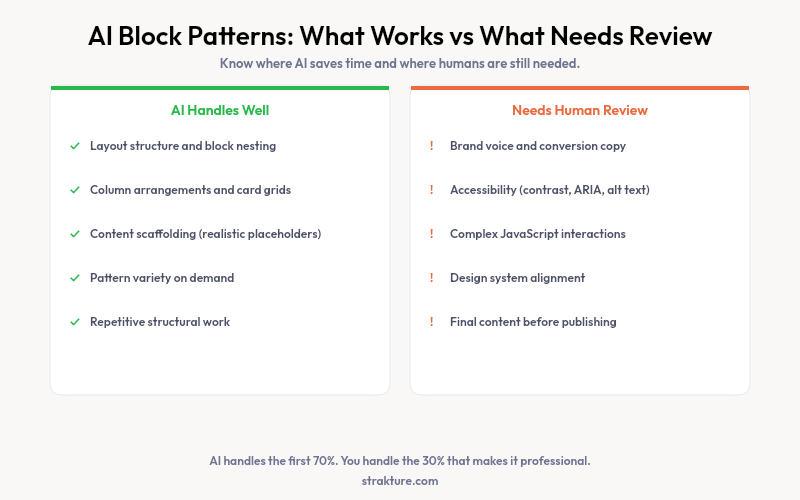
- Layout structure. AI can produce sensible column arrangements, card grids, and section hierarchies quickly. The block nesting and group structure is usually correct on the first pass.
- Content scaffolding. Placeholder text that matches the context of a section (a pricing table, a team bio grid) is generated accurately. It gives you a realistic draft to edit rather than lorem ipsum.
- Pattern variety. A static library has fixed entries. AI generation can produce a new variation of a section type on request. If you need a three-column feature grid with icons, you can ask for exactly that.
- Speed on repetitive work. Building the same section type across multiple pages manually is tedious. AI generation handles the repetitive structural work while you focus on content decisions.
What Still Needs Human Review
Honest coverage of AI tools means naming the gaps. These are consistent weak points across the category, not just one tool.
Brand Voice and Conversion Copy
AI generates plausible placeholder copy. It does not know your positioning, your audience, or your value proposition. Every piece of generated text needs a human pass before going live.
Accessibility
Generated patterns may have contrast issues or missing ARIA attributes. The WordPress accessibility standards require human review to meet properly. Run generated output through an accessibility checker before publishing. Do not assume the AI handled it.
Complex Interactions
Anything involving JavaScript behavior, custom query loops, or advanced block bindings still requires developer attention. AI-generated patterns stay within the standard block editor feature set. Anything beyond that is outside the current scope.
The Case for Theme-Aware AI Gutenberg Patterns
There is a real difference between inserting a pattern and one that fits. Theme-aware generation makes that possible at the AI layer rather than the editing layer.
When Strakture reads your design tokens before generating, the resulting block markup references your actual color slugs, registered font sizes, and spacing presets. You spend less time cleaning up output and more time editing content. For teams managing multiple sites, that difference compounds quickly.
Choosing the Right Tool
Starting from zero? A full-site AI builders versus pattern tools gets you there fast. Expect customization work afterward. Working on an existing site with a defined theme? Pattern-level generation with theme awareness is the better fit. It respects the design decisions already in place.
The WordPress Pattern Directory is also worth checking. It has thousands of community-submitted patterns. AI generation and the directory serve different needs and work well in combination.
AI WordPress Block Patterns: The Bottom Line
AI-powered pattern generation is genuinely useful. It handles layout structure and content scaffolding well. It saves real time on repetitive work. Where it needs help is brand voice, accessibility review, and anything requiring complex behavior.
The biggest variable is theme awareness. Tools that ignore your theme’s design tokens create extra work. Tools that read them create less. That distinction is worth checking before you commit to any workflow.
If you build on an FSE theme and want patterns that match your design system from the first insert, try Strakture and see how theme-aware generation feels in practice.
Are AI-generated block patterns compatible with all WordPress themes?
Standard block markup will insert into any block-enabled theme. The question is how well the output fits visually. Generic AI tools produce hardcoded styles that may conflict with your theme’s design. Theme-aware tools that read theme.json produce patterns that align with your existing colors, fonts, and spacing.
Do AI-generated patterns work with Full Site Editing?
Yes. Block patterns are a core part of the Full Site Editing architecture. AI-generated patterns with valid block markup insert cleanly into both the site editor and post editor. FSE themes rely heavily on patterns for layout consistency, which makes AI FSE patterns particularly well-suited to this workflow.
How do I know if an AI-generated pattern is accessible?
You do not know until you check. Use a tool like the WAVE browser extension or Lighthouse to audit generated patterns before publishing. Look specifically for color contrast ratios, image alt text, and heading order. AI tools do not consistently produce accessible output without review.
What is the difference between a WordPress block pattern generator and a full-site AI builder?
A WordPress block pattern generator creates individual sections or components within an existing site. A full-site AI builder creates an entire WordPress installation from scratch. Pattern generators are better suited to active content work and sites with existing brand guidelines. Full-site builders are suited to new projects where speed of initial setup is the main goal.

Leave a Reply