
Picking a wordpress landing page free theme shapes how fast you launch and how well the page converts. The right theme hands you a hero, a feature grid, and a call-to-action strip that already share the same spacing and color rules. The wrong one leaves you fighting the layout on every section.
This guide lists 10 free themes built for landing pages, each with a real screenshot from the WordPress.org theme directory so you can judge the look before you install. Some are Full Site Editing block themes. Others are one-page classics with years of proven use.
Every option here is free to download and works with current WordPress. Strakture sits at the top because its live demo is a software landing page, but the list runs from minimal single-product designs to media-heavy business layouts.
What Makes a Good WordPress Landing Page Free Theme
You can spot a landing-ready theme in about thirty seconds. It gives sections room to breathe, supports full-width imagery, and ships patterns you can assemble into a page without writing code.
Before you install anything, check for these five traits:
- Full-width and wide alignment on every block
- A pattern or template library with a hero, a feature section, and a CTA
- Global styles or a customizer for colors, fonts, and spacing
- Light front-end code so the page loads fast
- A blank or canvas template that drops the header and footer
Themes with a detailed theme.json token system also play nicely with pattern tools, which matters once you outgrow the built-in sections.
10 Free WordPress Landing Page Themes for 2026
Each theme below includes a screenshot, an honest note on what it fits, and a link to download it. The order starts with block themes and works through one-page classics.
1. Strakture
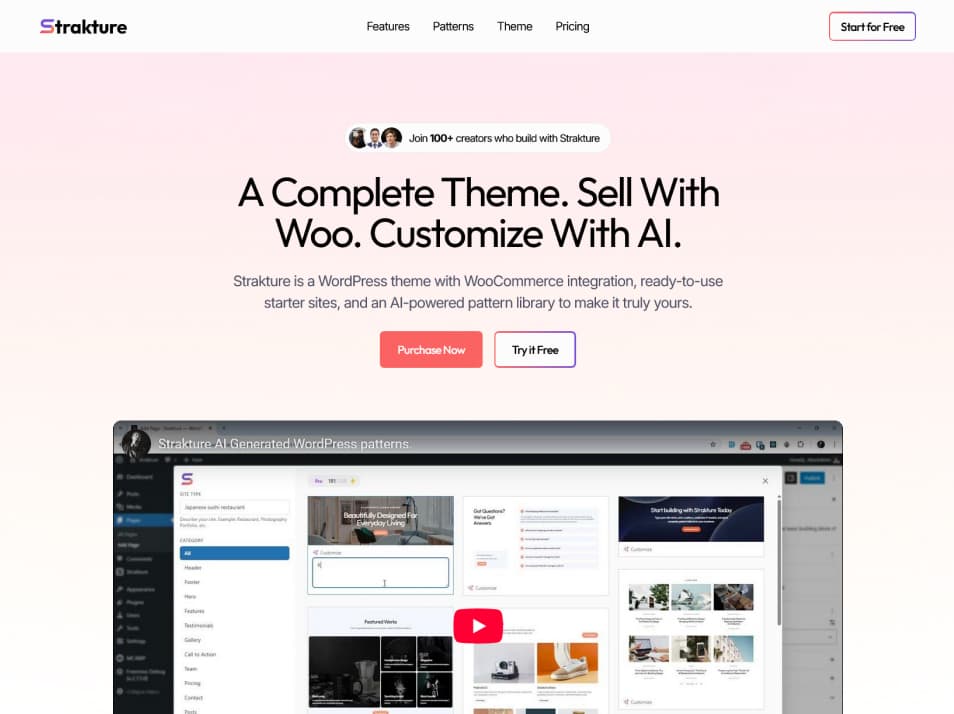
Strakture is a free Full Site Editing base theme, and its flagship demo is a software landing page with a bold hero, feature rows, and a pricing block. The design tokens are clean, so sections stay proportional as you build. It reads well for product and app pages out of the box.
The theme pairs with the Strakture plugin, which studies your active colors and spacing and generates new patterns that match. See the live Strakture demo to judge the style. Best for: SaaS, product, and app landing pages.
2. EnvisionX

EnvisionX is a block theme built for startups and marketing sites. It ships modern patterns for hero, features, and calls to action, plus style variations you can switch from global styles. The layout leans bold and spacious, which suits a product launch.
Grab it from the EnvisionX directory page. Best for: startup and app landing pages that want a current, block-native look.
3. Nokke

Nokke is a minimal block theme with a confident typographic system and generous whitespace. It works best when the product is the star and the page stays quiet around it. Full Site Editing gives you template control without extra plugins.
Download it from the Nokke directory page. Best for: minimalist product launches and creative single-page sites.
4. Astra

Astra is the most installed free theme on the directory, and much of that comes from its speed and its library of free landing page starter templates. You import a full layout, swap the copy and images, and publish. The core stays light, which helps load times.
One honest note: the best landing layouts arrive through the Starter Templates plugin, not the bare theme. Get it from the Astra directory page. Best for: any niche that wants a quick, importable starting point.
5. Business Landing Page

Business Landing Page does exactly what its name says. It sets up a single scrolling page with a hero, service blocks, and a contact section, so there is little to configure. This is a newer theme with a smaller user base, so expect fewer patterns than the big multipurpose options.
Find it on the Business Landing Page directory page. Best for: a simple business or service page with minimal setup.
6. Neve

Neve is a fast, mobile-first theme with a light footprint and a set of starter sites that include landing layouts. It works with the block editor and popular page builders, so you are not locked into one workflow. Performance is the main draw here.
Download it from the Neve directory page. Best for: teams that put page speed at the top of the list.
7. OnePress

OnePress is a classic single-scroll theme with a large hero and stacked sections for services, features, and contact. It has a long track record and strong ratings, so support material is easy to find. Setup runs through the Customizer rather than the block editor.
Get it from the OnePress directory page. Best for: a traditional one-page site with a familiar setup flow.
8. Hestia

Hestia brings a material design look to a one-page structure, with sections for features, team, pricing, and a subscribe form. It supports WooCommerce, so a small product launch fits without extra theming. The default styling reads clean and modern.
Download it from the Hestia directory page. Best for: app, agency, and small-shop landing pages.
9. Kadence

Kadence is a favorite among designers for its header and footer builder, granular design controls, and a library of starter templates that include landing layouts. It works closely with the block editor and its own blocks. The learning curve is a little steeper, but the payoff is control.
Find it on the Kadence directory page. Best for: builders who want fine control over every section.
10. Colibri WP

Colibri WP ships with a front-end drag-and-drop builder and dozens of prebuilt landing sections. You edit the page live and see changes as you go, which suits people who want a visual flow over the block editor. It leans toward marketing and small-business pages.
Download it from the Colibri WP directory page. Best for: no-code building with a visual, on-page editor.
Free Landing Page Theme Comparison
Here is how the 10 themes line up on the traits that matter for a landing page. Use it to shortlist two or three before you install.
| Theme | Editor | Landing Patterns | WooCommerce | Best For |
|---|---|---|---|---|
| Strakture | Full Site Editing | SaaS demo, generated patterns | Yes | Software and product pages |
| EnvisionX | Full Site Editing | Marketing patterns | No | Startup and app pages |
| Nokke | Full Site Editing | Minimal patterns | No | Minimalist launches |
| Astra | Hybrid | Starter templates | Yes | Quick importable starts |
| Business Landing Page | Customizer | Single-page layout | No | Simple service pages |
| Neve | Hybrid | Starter sites | Yes | Speed-focused builds |
| OnePress | Customizer | One-page sections | Yes | Traditional one-page sites |
| Hestia | Customizer | One-page sections | Yes | App and agency pages |
| Kadence | Hybrid | Starter templates | Yes | Design control |
| Colibri WP | Own builder | Prebuilt sections | Yes | Visual no-code building |
How to Choose the Right Theme for Your Landing Page
Match the theme to your content and your comfort with the editor. That single decision saves the most time later.
For a software or app page, Strakture, EnvisionX, or Nokke give you a block-native start with clean tokens. For a brand page with heavy imagery, Astra or Kadence let you import a full layout and restyle it fast. If you prefer a visual editor over blocks, Colibri WP or OnePress feel more familiar.
Check the theme.json or Customizer depth too. A theme with a real token system stays consistent as you add sections, and it works better with pattern tools. When you are ready to assemble the page itself, our guide on how to build a free landing page in the block editor walks through each section in order.
Match Any Theme With Patterns That Fit
Every theme here ships a pattern set, but a landing page often needs a section the theme skipped. Pull one from a random library and it clashes, since the colors and spacing come from a different design system.
This is the gap Strakture fills. The plugin reads your active theme’s colors, typography, and spacing, then generates new block patterns that match that design system. Instead of borrowing a mismatched hero, you get one built against the tokens your theme already uses, and it works the same way across all 10 themes above.
You can also lock your palette first with the free color palette generator and tint and shade generator, then let the patterns follow those colors.
Launch a Page That Looks Built for You
A free theme covers the frame: the hero, the sections, and the CTA. Your job is to keep the page focused on one goal and let the design stay consistent from top to bottom. Any theme on this list gets you there without a budget.
If you are tired of adjusting patterns to match your theme by hand, Strakture generates sections that fit the first time. Start free, browse the patterns, and see how a theme-matched page comes together.
Can I build a landing page with a free WordPress theme?
Yes. Every theme in this list ships patterns or sections for a full landing page, including a hero, features, and a call to action. Block themes handle template changes in the Site Editor, while one-page themes use the Customizer. None of these require a paid upgrade to publish a working page.
Which free WordPress theme is best for a landing page?
It depends on your content and editor preference. Strakture, EnvisionX, and Nokke suit block-native software pages. Astra and Kadence are strong for importable, image-heavy layouts. OnePress and Colibri WP fit people who prefer a visual, Customizer-style flow over the block editor.
Do free landing page themes work with the block editor?
Some do fully, and some only in part. Strakture, EnvisionX, and Nokke are Full Site Editing themes built around the block editor. Astra, Neve, and Kadence support blocks but also lean on the Customizer. OnePress, Hestia, and Business Landing Page are mainly Customizer themes.
How do I add more landing page sections to a free theme?
You have three routes. Check the WordPress pattern directory for community sections, build and save your own patterns, or use a tool like Strakture that generates new patterns against your theme’s design tokens so every section stays visually consistent.

Leave a Reply