
WordPress block patterns are pre-built section layouts you can insert into any page with a single click. They save hours of layout work and give you a consistent starting point. But the default pattern library is broad, not deep. This guide organizes the best free patterns by section type so you can find what you actually need.
We also cover what separates a well-built pattern from a fragile one, and what to do when the free library falls short.
What Are WordPress Block Patterns?
Open the Gutenberg block inserter, switch to the Patterns tab, and you get a grid of ready-made section layouts. Those are block patterns.
A block pattern is a group of blocks saved as a reusable layout. WordPress ships with a core set, and thousands more are available through the WordPress.org pattern directory. Theme authors can also bundle patterns in their theme using the block patterns API.
The WordPress Pattern Directory has grown from 480 patterns at launch to over 2,100 in 2026. Block patterns now account for approximately 35% of all block editor interactions, according to WordPress usage tracking data from Jetwizard.
Patterns differ from reusable blocks in one key way. Reusable blocks stay synced across every page. Patterns insert as independent copies. Edit one and the others stay untouched.
What Makes a Good Pattern (vs. a Bad One)
Not every free pattern is worth using. The difference usually comes down to how styles are applied.
A well-built pattern references your theme’s your theme’s design tokens. Colors come from var(--wp--preset--color--primary), font sizes from var(--wp--preset--font-size--large), and spacing from var(--wp--preset--spacing--60). When you switch themes or update your palette, the pattern updates with it.
A poorly built pattern hardcodes hex values, pixel sizes, and inline styles. It looks fine in the demo. It clashes with your site the moment you insert it.
The theme.json specification defines how these tokens work. When evaluating a pattern from any source, check whether it uses preset variables or hardcoded values. That single check will tell you whether it belongs in your site.
Free WordPress Block Patterns by Section Type
The WordPress.org pattern directory groups patterns into broad categories. Here is what to look for in each section type.
Hero Patterns
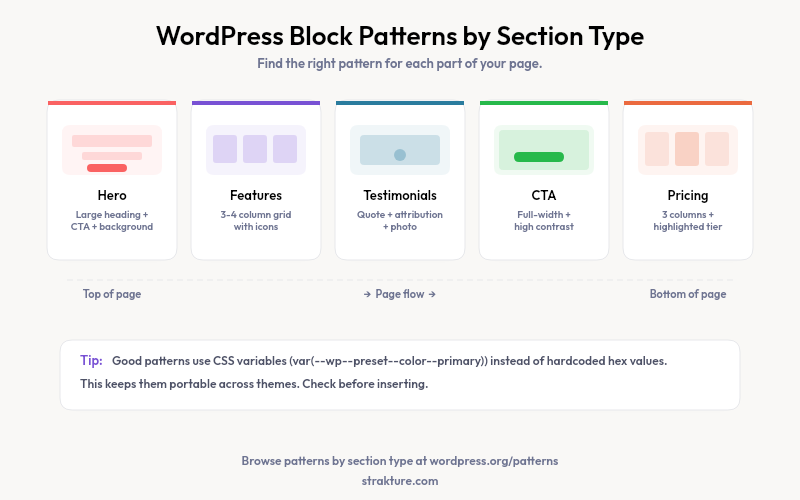
A hero section carries the most visual weight on the page. Good hero patterns include a large heading, a subheading, a call-to-action button, and a background tied to your theme’s primary or contrast color.
Watch for patterns that set a fixed pixel height. That breaks on mobile. A solid hero uses min-height in viewport units or lets content set the height. Search the directory for “hero” or “banner” and filter by the “Header” category.
Features and Services Patterns
Feature sections typically follow a grid: three or four columns, each with an icon, a short heading, and a couple lines of body text. The best free options use the core columns block with built-in responsive stacking so four columns collapse to a single stack on mobile without custom CSS.
Browse the “About,” “Services,” and “Portfolio” categories in the directory for grid layouts.
Testimonial Patterns
A strong testimonial pattern includes a quote, attribution, and optionally a photo or logo. Options range from a single centered quote to multi-column grids. The “Testimonials” filter in the directory surfaces these quickly.
One thing to check: does the pattern use the core quote block or loose paragraph blocks? The quote block carries semantic meaning and is better for accessibility.
Call-to-Action Patterns
CTA sections push visitors toward a single action: subscribe, buy, book, or contact. These are typically full-width, high-contrast sections with a heading and one or two buttons. Keep the layout tight. More than that dilutes the focus.
The “Call to Action” directory category has solid options. Favor patterns that use core button block styles rather than inline styles. Those inherit your theme’s button colors automatically.
Pricing Patterns
Pricing sections are harder to build than they look. Three columns, each representing a plan, with a features list and a highlighted tier. The “Pricing” directory category is small but growing.
Favor patterns that use background color tokens rather than hardcoded hex values to highlight the featured plan. That keeps pricing visually consistent with the rest of your site.
How to Insert a Pattern in the Block Editor
Open the block inserter, switch to the Patterns tab, and click any pattern to insert it at your cursor position. You can also browse patterns on WordPress.org outside the editor. Each listing has a “Copy” button. Paste the copied markup straight into the editor’s “Edit as HTML” mode.
The Block Patterns API reference covers how developers can register custom patterns from a plugin or theme for client sites.
When Free Patterns Are Not Enough
The pattern directory covers common layouts. It does not cover your specific design system. If your site runs a custom palette, a distinct typographic scale, or a non-standard grid, generic free patterns will always require rework after insertion.
A survey by developer market research firm Jetwizard found that 78% of WordPress site owners prefer pre-built patterns over building layouts manually, citing time savings as the primary reason.
That rework adds up fast. Adjust colors on one pattern, swap fonts on another, fix spacing on a third. Across ten sections you have spent more time editing than the pattern saved you.
This is the problem Strakture was built to solve. Strakture is a WordPress plugin that reads your active theme’s design system (colors, spacing, and typography) and generates block patterns that look native to your site. Instead of inserting a generic layout and adjusting it, you get a pattern that already matches your theme’s tokens.
It works inside the block editor through a modal panel. Select a section type, add an optional prompt, and Strakture generates the pattern using your actual theme variables. No page builder required.
Free users can browse and insert the original pattern library. Premium plans add AI-generated patterns matched to your theme generation with a monthly credit allowance.
Quick Tips for Using Block Patterns Well
- Preview in mobile view before publishing. Responsive behavior varies widely between patterns.
- Inspect the generated HTML before committing. Paste the pattern into a staging page and look for inline styles.
- Use synced patterns for repeated elements like headers and footers. Use unsynced copies for one-off sections.
- Group your blocks inside a core group block before saving a custom pattern. It keeps the structure portable.
Are WordPress block patterns free?
Yes. The patterns on the WordPress.org pattern directory are free to use on any site. Many themes also include bundled patterns at no cost. Some third-party plugins offer premium pattern libraries with extended options.
What is the difference between a block pattern and a block template?
A block pattern is a reusable section layout you insert into a page or post. A block template is a predefined content structure applied automatically when a new post or page is created. Templates are set by the theme or plugin; patterns are chosen by the editor.
Can I create my own block patterns in WordPress?
Yes. Build the layout you want in the editor, select all the blocks, open the block options menu, and choose “Create pattern.” WordPress saves it to your site’s pattern library. You can also register patterns programmatically using register_block_pattern() in a theme or plugin.
Do block patterns work with full site editing themes?
Yes. Block patterns work in both classic and FSE themes. In full site editing themes, patterns are also available inside the Site Editor for use in templates and template parts. FSE themes that ship with patterns include them in the /patterns folder of the theme directory.

Leave a Reply