
The wp–preset–color variables are the CSS custom properties WordPress builds from your theme’s color palette. Every color you define in theme.json becomes one, ready to reuse anywhere in your styles.
Open any Full Site Editing site and view the source. You will find them inside a global styles block, written like --wp--preset--color--primary, each holding the hex value for one palette entry.
Once you know how these variables are named and where they come from, you can style an entire site without hardcoding a single hex value. Here is how they work.
What Is the wp–preset–color Variable?
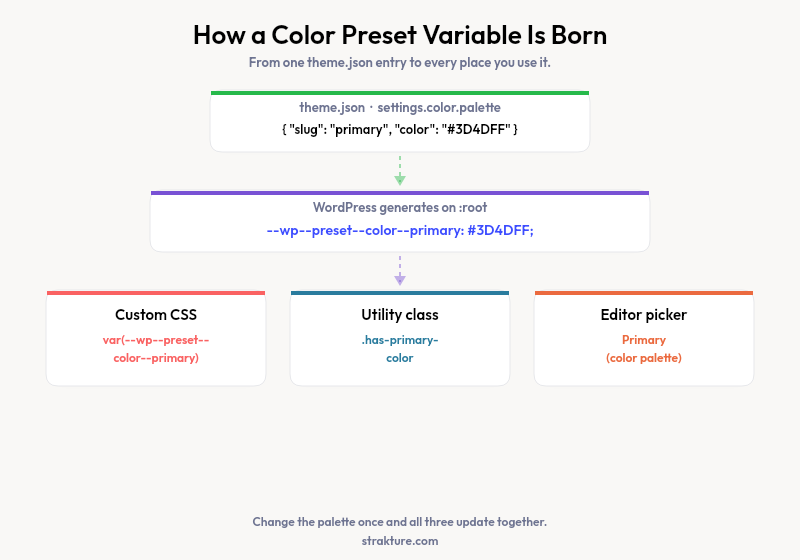
Every block theme generates these automatically. You never write them by hand. WordPress reads the color palette in your theme.json file and outputs one CSS custom property per color, following the pattern --wp--preset--color--{slug}.
The declarations land in a <style id="global-styles-inline-css"> block, scoped to :root. That means the values are available across the front end and inside the block editor, so a color looks identical in both places.
:root {
  --wp--preset--color--primary: #3D4DFF;
  --wp--preset--color--secondary: #FF7BCA;
  --wp--preset--color--tertiary: #7851D4;
  --wp--preset--color--background: #ffffff;
}
That snippet is real output from a live theme. Each line maps one palette color to a variable other styles can call. Read the full behavior in the WordPress global settings and styles handbook.
Where wp–preset–color Values Come From
You never define the variable directly. You define the palette, and WordPress generates the variable for you. The source is the settings.color.palette array in theme.json.
{
  "version": 3,
  "settings": {
    "color": {
      "palette": [
        { "slug": "primary", "name": "Primary", "color": "#3D4DFF" },
        { "slug": "secondary", "name": "Secondary", "color": "#FF7BCA" }
      ]
    }
  }
}
Three fields do the work. The slug becomes the variable suffix. The name shows up as the label in the editor color picker. The color holds the actual value.
Hyphens in a slug carry straight through. A slug of light-green produces --wp--preset--color--light-green. Slugs stay lowercase with no spaces, so pick them carefully. The theme.json reference documents every accepted field.
How to Use Color Presets in Your CSS
Here is the payoff. Once the palette exists, any stylesheet can call a color by its variable. This works in a child theme’s CSS, in a block’s Additional CSS, or in a custom plugin.
.my-callout {
  background-color: var(--wp--preset--color--primary);
  color: var(--wp--preset--color--background);
  border: 1px solid var(--wp--preset--color--tertiary);
}
Change the palette later and every rule updates on its own. No search-and-replace across files. That single behavior is why CSS custom properties matter for theming.
WordPress also builds matching utility classes for each palette color. Pick a color in the editor and the block receives a class you can target directly.
.has-primary-colorsets text color.has-primary-background-colorsets background color.has-primary-border-colorsets border color
The Full Family of wp–preset Variables
Color is one member of a larger set. WordPress applies the same naming logic to every design token in theme.json, so once you read one pattern you can predict the rest.
| theme.json setting | Variable pattern | Example |
|---|---|---|
| color.palette | –wp–preset–color–{slug} | –wp–preset–color–primary |
| color.gradients | –wp–preset–gradient–{slug} | –wp–preset–gradient–sunset |
| typography.fontSizes | –wp–preset–font-size–{slug} | –wp–preset–font-size–large |
| typography.fontFamilies | –wp–preset–font-family–{slug} | –wp–preset–font-family–body |
| spacing.spacingSizes | –wp–preset–spacing–{slug} | –wp–preset–spacing–40 |
| shadow.presets | –wp–preset–shadow–{slug} | –wp–preset–shadow–natural |
Anything you add under settings.custom follows a sibling pattern, --wp--custom--{path}. A custom entry named lineHeight.body becomes --wp--custom--line-height--body, converting camelCase into kebab-case.
Common Mistakes With Color Presets
You added a palette color, called its variable, and nothing changed. Most of the time one of these four issues is the cause.
- Wrong slug. The variable follows the slug, not the display name. A color named “Brand Blue” with the slug
brand-bluegives--wp--preset--color--brand-blue. - Site Editor overrides. Changes made in Global Styles save to the database and win over
theme.json. If a value looks off, check the Site Editor first. - Removed color. Delete a palette entry and its variable disappears. Any rule still calling it falls back to the property default.
- Wrong preset family. Font sizes use
--wp--preset--font-size--, not the color prefix. Mixing families produces an undefined variable.
Design With Tokens, Not Hardcoded Values
Preset color variables turn your palette into a single source of truth. Define a color once, reference it everywhere, and updates ripple through the whole site. That is the core promise of a design system built on theme.json.
The tricky part is getting new sections to respect those tokens. Strakture reads your theme’s palette and generates block patterns that already call the right preset variables, so inserted sections match your colors instead of fighting them. If you would rather not hand-map every hex value, that is the gap it fills.
wp–preset–color FAQs
What is wp–preset–color in WordPress?
It is a CSS custom property WordPress generates from your theme’s color palette. For each color in theme.json, WordPress creates a variable named --wp--preset--color--{slug} and prints it on :root. You call it in CSS with var() to reuse palette colors without repeating hex codes.
How do I use theme.json colors in custom CSS?
Reference the preset variable inside a var() function. For a palette color with the slug primary, write color: var(--wp--preset--color--primary). This works in child theme stylesheets, a block’s Additional CSS panel, and plugin styles, since the variable is defined globally on :root.
Why is my wp–preset–color variable not working?
Check the slug first, since the variable name matches the slug exactly, not the display name. Confirm the color still exists in your palette and has not been removed. Also check the Site Editor, because Global Styles changes save to the database and override the values in theme.json.
What is the difference between wp–preset–color and wp–custom?
Preset variables come from named design tokens like the color palette, gradients, and font sizes. Custom variables come from the freeform settings.custom object, where you can define any value you want. Presets also appear in editor pickers, while custom values are available only in CSS.

Leave a Reply